Comparing Features of OpenClaw and Kimi Claw
Explore the key differences between OpenClaw and Kimi Claw.
Features | Kimi Claw | |
|---|---|---|
Deployment Method | Self-hosted on local devices. | Managed cloud solution. |
Data Privacy | Full control over data privacy. | Data stored in the cloud. |
Setup Complexity | Requires manual setup and configuration. | One-click setup, no maintenance. |
Skill Access | Access to 5000+ community skills. | Same skills available, cloud-based. |
Cost Structure | Variable costs based on self-hosting. | Subscription starts at $39/month. |
Task Automation | Manual task management. | Automated scheduling and reminders. |
User Experience | Highly customizable and flexible. | User-friendly and straightforward. |
Performance Reliability | Dependent on local hardware. | Consistent performance via cloud servers. |
Community Support | Strong community-driven support. | Direct support with subscription. |
You may ask if you should use OpenClaw or Kimi Claw for your AI helper. Kimi Claw is not its own product. It is a managed way to use OpenClaw in your browser and in the cloud. If you care about privacy and want to run things on your own device, OpenClaw lets you control everything. If you want something easy and fast that can do tasks right away, Kimi Claw is simple to use. Many people switch because they want to save money, run things locally, and get better logical thinking for their daily jobs.
Key Takeaways
OpenClaw lets you have full control and privacy. It runs on your own device. This is good for people who care about data security.
Kimi Claw makes things easy with a one-click setup. It is great for people who want fast AI automation. You do not need to deal with hard tech stuff.
Both tools have many skills through ClawHub. But Kimi Claw is better for team work and task automation in the cloud.
Think about what you need. Pick OpenClaw if you want more control and privacy. Pick Kimi Claw if you want things to be easy and fast.
Prices are different. OpenClaw can cost less if you host it yourself. Kimi Claw gives you a managed service and support for a monthly fee.
Overview
What Is OpenClaw?
OpenClaw lets you be in control of your AI helper. You run it on your own device, so you are the boss. You get to keep your data safe and private. OpenClaw works with apps like WhatsApp, Telegram, Discord, and Slack. You can use it for things at home, helping customers, or coding tasks. It uses Docker Compose, which makes starting easy, but you must handle your own keys and passwords. OpenClaw keeps your info safe. You pick how your helper works and what skills it has. There are thousands of skills in the ClawHub skills registry, so you can make OpenClaw fit your needs.
If you care about privacy and want to be in charge, OpenClaw is a good choice.
What Is Kimi Claw?
Kimi Claw makes using OpenClaw easy. It works in your browser and in the cloud. You do not need to set up or fix anything. With one click, your agent starts and works all day and night. Kimi Claw is great for teams, leaders, and people who need fast answers. You get the same ClawHub skills, but everything is online. Kimi Claw saves your work, plans tasks, and sends messages to your chat apps. You pay every month, starting at $39. Many people pick Kimi Claw because it saves time and money. The price is good for people who want easy automation.
Kimi Claw is a managed way to use OpenClaw.
You get automation, cloud storage, and planning without hard setup.
The price helps more people try Kimi Claw, especially if they want to save money.
If you want things to be easy and automatic, Kimi Claw is a smart pick.
Features
Core Functions
You want to know what these tools can do for you. Here’s a quick look at their main functions:
Function | Description |
|---|---|
Local Execution | Runs on your own device, so your data stays with you. |
Chat App Integrations | Lets you manage tasks right from apps like Slack or Telegram. |
Task Automation | Handles routine jobs, like writing code or running reports, without you lifting a finger. |
Extensible Skills and Plugins | Lets you add new tools and connect different systems for a custom workflow. |
Model Flexibility | Gives you choices in how you use AI models for different needs. |
Both OpenClaw and Kimi Claw share these core features. You get strong chat app connections, smart automation, and the power to add new skills. You can turn messages into actions and let your AI handle boring tasks.
Unique Capabilities
Now, let’s see what makes each one stand out. OpenClaw puts you in charge. You run everything on your own hardware. This means you keep your data private and safe. You can pick which skills to use from the ClawHub skills registry, which has over 5,000 options. You can even build your own tools if you want.
Kimi Claw takes a different path. You get a browser-first, cloud-based experience. You don’t need to set up anything. With one click, your agent runs all day and night. Kimi Claw shines when you want easy automation. You can schedule tasks, store files in the cloud, and get updates sent to your chat apps. Teams love how fast they can start and automate work.
Tip: If you want privacy and control, OpenClaw is your friend. If you want speed and zero setup, Kimi Claw is the way to go.
Performance

Speed & Reliability
You want your AI helper to be fast and always ready. OpenClaw runs on your own device. This means you control the speed. If you have a strong computer, OpenClaw can answer quickly. You do not need to wait for the internet. Your data stays close, so you get fast replies. If your device is busy or slow, you might notice a small delay.
LinkStart AI Radar
¡Únete a nuestra comunidad de Telegram para más actualizaciones de IA!
Kimi Claw works in the cloud. You do not need to worry about your computer’s power. The cloud keeps your agent running all day and night. You get answers even if your laptop is off. Kimi Claw uses strong servers, so you see steady speed and high reliability. If you have a good internet connection, you get smooth and quick results. Teams like this because everyone gets the same fast service.
Tip: If you want your agent to work 24/7 without breaks, Kimi Claw is a great choice. If you want replies that do not depend on the internet, OpenClaw gives you that control.
Efficiency
Let’s talk about how each one uses resources. OpenClaw uses your own device’s memory and storage. You decide how much power to give it. If you want to save energy, you can turn it off when you do not need it. This helps you manage your own resources.
Kimi Claw handles everything for you. The cloud takes care of memory, storage, and updates. You do not need to check on it or fix anything. You can run big jobs or schedule tasks without slowing down your own computer. This makes Kimi Claw very efficient for teams or people who want to automate lots of work.
Here’s a quick look:
Feature | OpenClaw (Local) | Kimi Claw (Cloud) |
|---|---|---|
Runs 24/7 | Only if your device is on | Yes, always |
Uses your power | Yes | No |
Needs internet | No | Yes |
You get to pick what works best for your needs.
Usability
Setup & Onboarding
Getting started can make or break your experience with any tool. If you choose OpenClaw, you take the hands-on route. You need to download files, set up Docker Compose, and enter your own API keys. This process gives you full control, but it can take a while—sometimes a whole weekend if you are new to these tools. You might need to search for guides or ask for help if you get stuck.
Kimi Claw changes the game. You just click once, and your agent is ready in seconds. You do not need to worry about servers, passwords, or hidden costs. This quick start makes Kimi Claw perfect if you want to skip the tech headaches and get right to work. Many users say this simple setup helped them try AI agents for the first time.
Tip: If you want to avoid a long setup, Kimi Claw is the fastest way to start.
User Experience
Day-to-day use feels different with each tool. OpenClaw gives you lots of choices. You can pick your favorite AI models and add new skills from the ClawHub registry. You get to decide how your agent works. This flexibility is great if you like to tinker and build your own workflows.
Kimi Claw focuses on making things easy. You get a clean browser interface and smart automation. You can schedule tasks, store files, and get updates in your chat apps. Many users love Kimi Claw for its cost-effectiveness and strong performance in different languages. Some users use it for routine jobs and switch to advanced models only when needed. This helps you manage costs and keep things simple.
Users recommend Kimi Claw for quick setup and smooth teamwork.
OpenClaw stands out if you want to customize everything and connect with many AI models.
Note: Your choice depends on what you value more—speed and ease, or control and flexibility.
Cost & Licensing
Pricing
When you look at the cost, you want to know what you’re really paying for. OpenClaw gives you a self-hosted option. You pay for your own server and any AI model API fees. This can be as low as $9 a month if you use a basic setup. If you want someone else to handle the hosting, there are managed options. Kimi Claw, for example, starts at $39 a month and includes everything—hosting, updates, and support. You just pay the subscription and get started.
Here’s a quick look at the different pricing models:
Pricing Model | Cost per Month |
|---|---|
Self-Hosted (raw server + API) | ~$9 |
Managed Hosting (ClickClaw) | $20 |
Managed Hosting (OpenClaw Cloud) | $39 |
Managed Hosting (ClawRapid) | $45 |
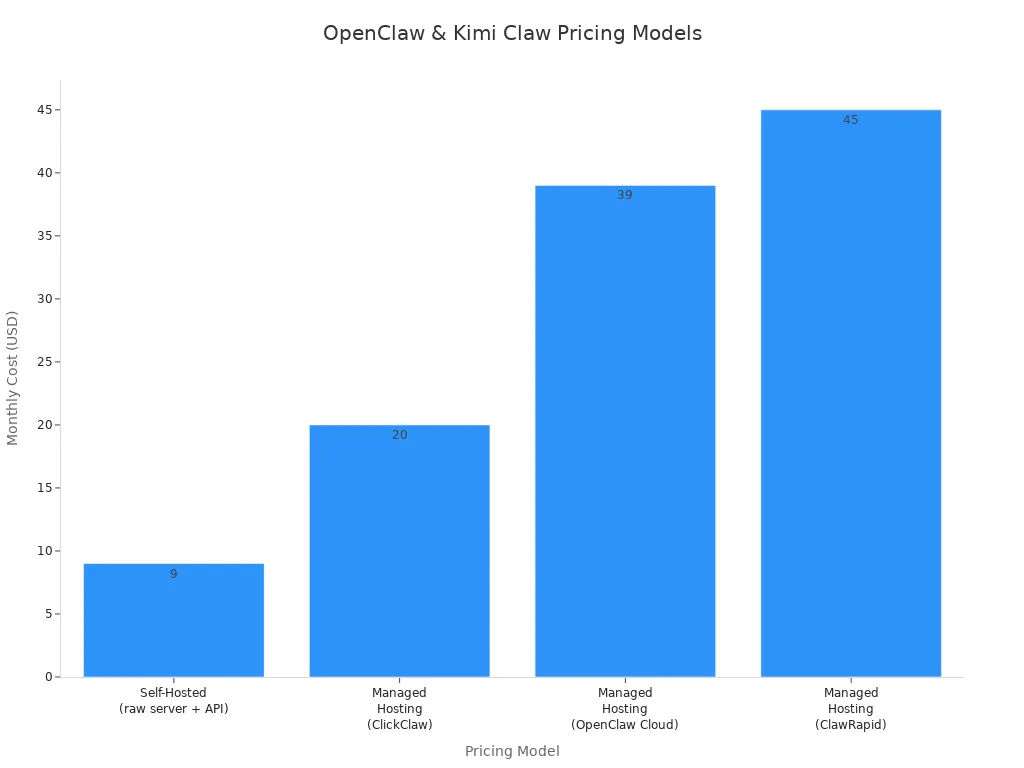
You can see that self-hosting is the cheapest way to run OpenClaw. Managed hosting and Kimi Claw cost more, but you get less work and more support.
Value
You want to get the most for your money. If you pick self-hosted OpenClaw, you save cash, but you need to set up and manage everything yourself. This means you control your data and can tweak things as you like. If you use Kimi Claw, you pay a bit more, but you get a ready-to-go agent, cloud storage, and no setup headaches. Teams and busy users often find this worth the price.
Watch out for hidden costs. If you use a free cloud tier for OpenClaw, you might need to upgrade to a paid plan to keep your agent running. Free accounts can get shut down or reclaimed if you don’t upgrade, which could lead to surprise costs or lost work. Kimi Claw’s subscription covers hosting and storage, so you know what you’ll pay each month.
Tip: If you want to save money and don’t mind doing the work, self-hosted OpenClaw is a good pick. If you want everything handled for you, Kimi Claw’s subscription makes life easier.
Community & Support
Documentation
You want to get started fast. Good documentation helps you do that. OpenClaw gives you a full set of guides and setup instructions. You can find step-by-step tutorials, code samples, and answers to common questions. If you like to dig into details, you will enjoy the technical docs. These guides help you set up OpenClaw on your own device and connect it to your favorite chat apps.
Kimi Claw takes a different approach. You get quick-start guides and simple walkthroughs. The docs focus on helping you launch your agent in the browser with just a few clicks. You do not need to read long manuals. The guides show you how to use cloud storage, schedule tasks, and connect to chat apps. If you want to get going without much reading, Kimi Claw’s docs make it easy.
Here’s a quick comparison:
Feature | OpenClaw Docs | Kimi Claw Docs |
|---|---|---|
Setup Guides | Detailed, technical | Simple, step-by-step |
Skill Registry | Full reference | Quick access |
Troubleshooting | Community-driven | FAQ and tips |
Tip: If you like deep dives, OpenClaw’s docs are for you. If you want fast answers, Kimi Claw keeps it simple.
User Support
You might need help along the way. OpenClaw has a strong community. You can join forums, chat groups, and Discord servers. People share tips, answer questions, and post new skills. If you run into a problem, you can ask the community and get help from other users. You also find lots of user-made guides and videos.
Kimi Claw offers direct support with your subscription. You can send questions to the support team and get answers fast. Teams like this because they do not have to wait for community replies. You also get updates and news right in your dashboard. If you want a mix of community and official help, Kimi Claw gives you both.
OpenClaw: Big community, lots of shared knowledge.
Kimi Claw: Fast support, easy access to help.
Note: You get support either way. Pick the style that fits you best.
Use Cases
Best for Privacy & Control
Do you want to keep your data safe and stay in charge? OpenClaw gives you the power to control everything. You run the agent on your own device. You decide who can access it. Your files and conversations never leave your machine. You can even add encryption for extra safety. Here’s a quick look at the privacy features you get:
Privacy Feature | Description |
|---|---|
Local Data Control | All data stays on your device. |
No External Data Transmission | No data sent to outside servers. |
Encryption Options | You can encrypt conversations and history. |
Access Control | You choose who can use your agent and set permissions. |
You also get full control over how your AI works. You can pick your favorite open-source models, fine-tune them, and try new ones as soon as they come out. You pay less because you use your own hardware. If you want to build your own workflows and keep everything private, OpenClaw is your best choice.
Best for Automation & Teams
Do you want to save time and let your team work faster? Kimi Claw makes automation easy. You do not need to set up anything. You just open your browser and start working. Kimi Claw gives you access to over 5,000 skills. You can schedule tasks, store files in the cloud, and get updates in your chat apps. Your agent remembers what you did, so you do not have to repeat yourself.
Here’s how Kimi Claw helps teams:
Feature | Kimi Claw | OpenClaw |
|---|---|---|
Setup | Zero setup, browser-based | Needs local installation |
Skills Access | 5,000+ community skills | Manual skill integration |
Task Scheduling | Automatic and recurring | |
Memory | Long-term, persistent | No built-in persistent memory |
Server Management | None required | You manage your own server |
Kimi Claw acts like a tireless assistant. It runs reports, sends reminders, and keeps your projects on track. You do not need to worry about servers or updates. Many teams use Kimi Claw to boost productivity and get real-time updates on their work.
Scenario Recommendations
Let’s match the right tool to your needs. Here are some examples to help you decide:
If you care most about privacy, choose OpenClaw. You keep your data on your device. You control every setting. You can use the latest open-source models and fine-tune them for your tasks.
If you want to automate daily tasks for your team, pick Kimi Claw. You get easy setup, cloud storage, and smart scheduling. Your team can start using AI right away, with no tech headaches.
If you like to experiment and build your own workflows, OpenClaw lets you connect AI to your local machine. You can teach your agent to manage files, run code, and even control your browser.
If you need a tool that just works, Kimi Claw is ready in seconds. You can automate reports, get reminders, and share results with your team. You do not need to manage servers or worry about updates.
Tip: Think about what matters most to you—privacy and control, or speed and teamwork. That will help you pick the right tool.
Many users and teams have seen big gains. They get more done, automate boring jobs, and see real-time results. You can use these tools for research, reporting, coding, or just staying organized. The choice is yours.
Pros and Cons
OpenClaw Pros & Cons
Let’s break down what you get with OpenClaw. You might like seeing the main advantages in a table:
Advantage | Description |
|---|---|
Local Execution | You run everything on your own hardware. Your data never leaves your device. |
Task Automation | You can turn chat messages into actions and automate daily jobs. |
Privacy Features | You stay in control. Your info stays private and secure. |
You can do a lot with OpenClaw. Here are some things you might enjoy:
You can automate writing code or running scripts right on your computer.
If you manage systems, you can set up routine jobs and save time.
You can build your own tools and connect different apps using skills and plugins.
Some users say setup can be tricky. If you rush, you might miss important security steps. Take your time and follow the guides to keep your data safe.
Kimi Claw Pros & Cons
Kimi Claw makes things easy. You get a browser-first experience that works right away. You can manage files, schedule your calendar, and let your agent handle tasks without any setup. This tool stands out because you can automate jobs and get real-time updates, all from your browser.
Here’s a quick look at what you might want to know:
Limitation Type | Description |
|---|---|
Less low-level control | You don’t get as much fine-tuning as with self-hosted solutions. |
Workflow brittleness | Sometimes, changes in tools can break your automated workflows. |
Cloud storage may not fit strict privacy needs for sensitive data. | |
Skill quality variance | Some skills may work better than others in the large skill library. |
You get speed and ease, but you trade some control. If you want everything to just work, Kimi Claw is a great pick. If you need to tweak every detail, you might want more control.
Tip: Think about what matters most—do you want full control, or do you want things to be simple and automatic?
You need a tool that works for you. If you want privacy, control, and safety, OpenClaw is the best choice. Here’s how what you care about matches with OpenClaw:
OpenClaw Feature | |
|---|---|
Security | Treats secrets as high value targets |
Control | Runs AI models locally |
Safety | Keeps workspace minimal and secure |
Accessibility | Direct file and workflow access |
Continuous Operation | Always on, runs 24/7 |
If you want something fast to set up and easy to use, Kimi Claw is a good pick. Not sure which to choose? Think about what is most important to you—privacy or convenience. Choose the one that fits how you like to work.
FAQ
What’s the main difference between OpenClaw and Kimi Claw?
You run OpenClaw on your own device. You control everything. Kimi Claw works in your browser and the cloud. You get one-click setup and easy automation. Both use the same skills, but Kimi Claw handles the hard parts for you.
Which one is better for teams?
Kimi Claw is better for teams. You get fast setup, cloud storage, and easy sharing. Your team can start using AI right away. OpenClaw works best if you want full control and privacy for yourself.
Can I switch from Kimi Claw to OpenClaw later?
Yes, you can switch. Both use the same skills and workflows. You can move your setup from Kimi Claw to OpenClaw if you want more control or need to run things locally.
Do I need to know how to code to use either tool?
No, you don’t need to code. Kimi Claw is ready in one click. OpenClaw needs a bit more setup, but you can follow guides. You can add skills without writing code.
Is my data safe with both options?
OpenClaw keeps your data on your device. You control privacy. Kimi Claw stores data in the cloud. You get strong security, but your files are online. Pick the one that matches your privacy needs.
See Also
OpenAI Fast-Tracks GPT-5.2 To Compete With Google Gemini 3
ACE Studio 2.0 Competes With Suno AI For Top Music Tool
Google's Antigravity AI Revolutionizes Coding With Gemini 3 Pro