Comparing Features of Two AI Platforms
Explore the differences between Google AI Studio and Anthropic Console.
Features | Google AI Studio 2.0 | Claude |
|---|---|---|
Cost-Effectiveness | High with free tier options | High with pay-as-you-go model |
Multimodal Support | Supports text, images, audio | Limited to text only |
Prototyping Speed | Fast prototyping capabilities | Moderate prototyping speed |
Coding & Reasoning | Good for basic coding tasks | Excellent for coding and logic |
Security & Privacy | Standard security measures | Advanced privacy features |
Documentation | Basic guides available | Extensive documentation provided |
Workflow Integration | Easy integration with Gemini API | API for chatbot integration |
Export to Production | Yes, supports export | Yes, supports export |
You want to find the best platform for you. Google AI Studio lets you build things quickly. It is free to use. It has powerful tools for different types of data. Anthropic Console is great for coding jobs. It keeps your information very safe. Many developers in Washington D.C. and Singapore use Anthropic Console a lot. They use it for school and work. Product teams like Google AI Studio because it is fast. It works well with other tools. Business users like Anthropic Console’s privacy features.
Key Takeaways
Google AI Studio is great for making ideas fast. It works with text, images, and audio. You can build and test things quickly. You do not have to pay to try it.
Anthropic Console is best for coding and thinking tasks. It has strong tools for math and logic. This makes it good for developers.
Both platforms let you use them for free. Google AI Studio does not need a credit card. This makes it easier for students and new businesses.
Pick Google AI Studio if your project needs many types of input. Choose Anthropic Console if you care about data privacy and advanced coding.
Look at the comparison tables in the blog. They help you see which platform fits your project and goals.
Quick Verdict
Best for Prototyping
Google AI Studio is good for making and testing ideas fast. You can use it for free. You can work with text, pictures, and sounds right away. The platform helps you turn ideas into working models in a few minutes. Many teams pick it because it is quick and simple to use. You can work with long documents and many kinds of data in one spot.
Here is a quick look at how both platforms do for fast prototyping:
Platform | Cost-Effectiveness | Multimodal Support | Context Length | Best Use Case |
|---|---|---|---|---|
Google AI Studio | High | Yes | 1M tokens | Fast prototyping |
Anthropic Console | High (Claude 4.5) | No | N/A | Production workloads |
Google AI Studio is great for teams who want to try lots of ideas without spending much.
Gemini 2.5 Flash in Google AI Studio can handle long papers and pictures, so you can make more advanced models.
Anthropic Console with Claude Opus 4.5 is strong for big jobs but does not let you use different types of data together.
Best for Coding and Reasoning
Anthropic Console with Claude is best if you need strong coding and thinking skills. It is very accurate for coding and math tasks. Claude Opus 4.5 gets higher scores than Gemini 2.5 Pro in coding and math tests.
Here is a table showing how they compare:
Model | Coding Benchmark (SWE-bench) | Math Competition (AIME 2025) | Visual Reasoning (MMMU) |
|---|---|---|---|
Claude Opus 4.5 | 72.5% | 90.0% | 76.5% |
Gemini 2.5 Pro | 63.2% | ~83.0% | 79.6% |
Claude gives better results for step-by-step logic and hard coding.
Gemini 2.5 Pro is good at visual reasoning and works well with pictures and words together.
If you want the best tool for coding or solving tough problems, Anthropic Console is a smart pick.
Tip: Use Google AI Studio if you want to build things fast and try new ideas. Choose Anthropic Console if you need strong coding and thinking skills.
Comparison Overview
Google AI Studio vs Anthropic Console Table
You want to compare these platforms easily. The table shows important features. It helps you pick the best one for your needs.
Feature | Google AI Studio | Anthropic Console |
|---|---|---|
Multimodal Support | Yes (text, image, audio) | No (text only) |
Coding & Reasoning | Good | Excellent |
Easy with Gemini API | API for chatbots | |
Prototyping Speed | Fast | Moderate |
Security & Privacy | Standard | Advanced |
Pricing | Free tier, low cost | Free tier, pay-as-you-go |
Documentation | Basic guides | Extensive guides |
Export to Production | Yes | Yes |
Tip: Use this table to check which features you need most. If you use images or audio, look at multimodal support. If you need strong logic, check coding and reasoning.
Key Differences
You can spot some big differences between these platforms. Here are the main things to know:
Google AI Studio lets you build and test ideas fast. You can use text, images, and audio together.
Anthropic Console is best for coding and reasoning. It helps with math and logic tasks.
Google AI Studio makes workflow integration simple. It connects to Gemini API and Vertex AI.
Anthropic Console has advanced privacy and security. Your data stays safe.
Anthropic Console gives you more guides and examples. This helps you learn quickly.
LinkStart AI レーダー
AIの最新情報はTelegramコミュニティに参加してチェック!
Both have friendly pricing. You can start for free and pay later.
Note: Pick Google AI Studio if you want fast prototyping and multimodal tools. Choose Anthropic Console if you need strong coding and privacy.
Google AI Studio Features

Multimodal Capabilities
Google AI Studio lets you use many data types. You can work with text, code, and structured data together. This helps you make smarter models. Here are some special things you get:
Gemini lets you mix text, code, and structured data. You can use different data types at the same time.
You can link Google Workspace and Google Cloud. This makes your work faster and easier.
The platform is good with structured data queries. You can use tables and lots of data without problems.
You get good API prices and can use it worldwide. This helps you grow your projects anywhere.
Tip: If you want to build models with text, images, and code, Google AI Studio gives you more choices than Anthropic Console.
Workflow and Integration
Google AI Studio helps you get more done with its workflow tools. You can automate tasks and manage projects in one place. The table below shows how these features help you:
Feature | Benefit for You |
|---|---|
You save time by staying in one platform | |
Coding assistance | You get help building larger apps |
Firebase-backed app features | You can deploy projects at scale |
Single playground | You create content campaigns in one conversation |
Your team works together easily | |
You finish content faster |
You can write blog posts, make images, and create videos in one place. This means you spend less time making content. Your team can work together easily, so you finish projects faster.
Note: Google AI Studio’s workflow tools make it easier for big teams to handle hard projects than Anthropic Console.
Anthropic Console Features
Conversational AI Strengths
Anthropic Console has strong tools for making conversational AI. You can build chatbots and virtual helpers that answer your questions clearly. Claude models are very good at handling hard conversations. They give answers you can trust for customer help, school, and work tasks. Claude can solve math, write code, and explain ideas in simple steps. The platform lets you make chatbots that remember what you said before. This keeps the talk going smoothly. Anthropic Console is known for being right when coding or solving logic problems. Claude can answer hard questions and explain things in detail.
Tip: If you want an AI that talks, solves problems, and helps people, Anthropic Console is a great choice.
Here is a table to compare:
Feature | Anthropic Console | Google AI Studio |
|---|---|---|
Conversational Quality | Excellent | Good |
Coding Accuracy | High | Moderate |
Context Handling | Strong | Good |
Developer Support
Anthropic Console gives you lots of help as a developer. The platform has easy-to-read guides, sample code, and instructions to get you started. You can find lessons and real project ideas to try. Anthropic gives you SDKs so you can add Claude to your apps fast.
Developer guides help you learn the platform.
Forums let you talk to other developers.
Tutorials show you how to solve problems step by step.
Use cases give you new ideas.
Courses teach you more advanced skills.
You can join the Anthropic community to ask questions and share your projects. The platform gives you examples and learning tools to help you. You get support from your first chatbot to bigger business projects.
Note: Anthropic Console has more guides and community help than Google AI Studio. You can learn faster and make better projects.
Pricing Comparison
Google AI Studio Pricing
You can start using Google AI Studio for free. The platform gives you a generous free tier with no credit card needed. You pay only for what you use after you reach the free limits. The pricing uses a token-based model. For Gemini 2.5 Pro, you pay $1.25 per million input tokens and $10 per million output tokens up to 200,000 tokens. If you use more, the price goes up to $2.50 for input and $15 for output per million tokens. Batch mode gives you about a 50% discount, and context caching can lower your costs even more. Workspace plans with AI features start at $8.40 per user each month. You can see the usage tiers in the table below:
Tier | Requests/Minute | Tokens/Minute | Requests/Day | Images/Minute |
|---|---|---|---|---|
Free | 5-15 | 250K | 100-250 | 2 |
Tier 1 | 20-300 | 100K-1M | 250 | 20 |
Tier 2 | 1,000+ | 2M | 10,000+ | 100 |
Tier 3 | 4,000+ | N/A | 50,000+ | N/A |
Tip: Startups and small teams save money with the free tier and pay-as-you-go model.
Anthropic Console Pricing
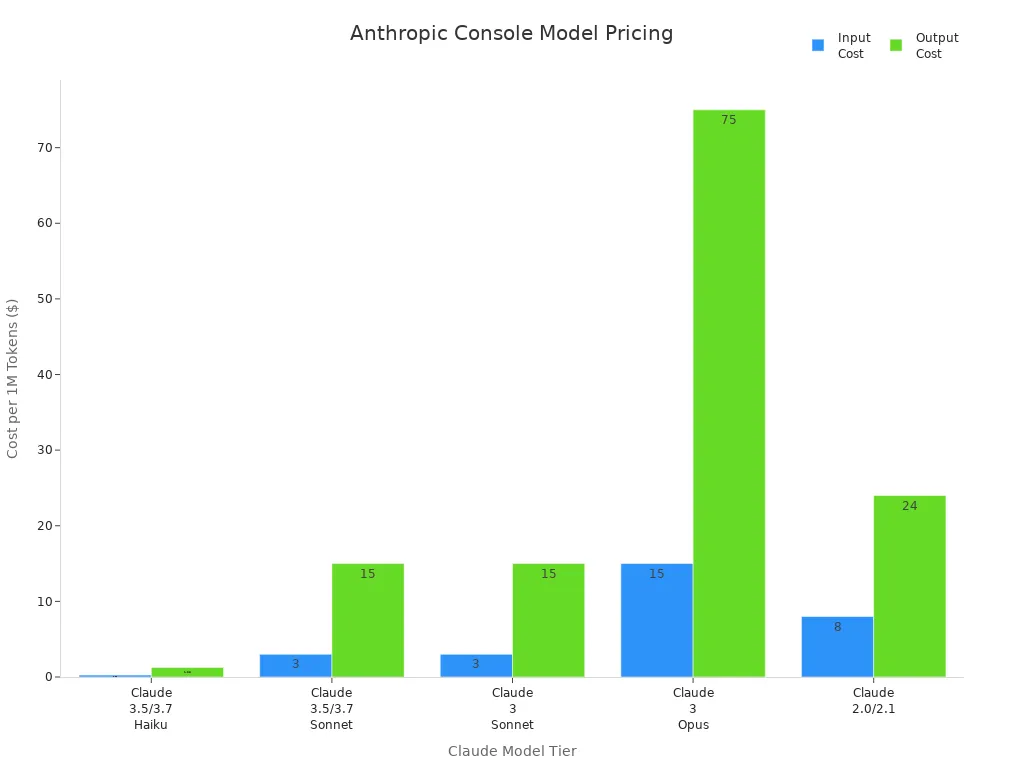
Anthropic Console uses a pay-as-you-go model for its Claude models. You can choose from different models like Haiku, Sonnet, and Opus. Each model has its own price per million tokens. For example, Haiku costs $0.25 for input and $1.25 for output. Sonnet costs $3 for input and $15 for output. Opus costs $15 for input and $75 for output. Anthropic also offers subscription plans. The Pro plan costs $20 per month and gives you more usage and faster responses. The Max plan costs $100 per month for even higher usage. Team and Education plans are also available.
Note: Anthropic recently lowered prices on flagship models, making them more affordable for many users.
Free Tiers and Trials
You get different free options with each platform. Google AI Studio gives you ongoing free API access with no credit card required. You can test and build with up to 1 million tokens in context and up to 1,000 daily requests. Anthropic Console offers a free plan with basic access to Claude Sonnet and limited daily use. To use the API, you need to add a credit card. The table below shows a quick comparison:
Feature | Google AI Studio (Gemini) | Anthropic Console (Claude) |
|---|---|---|
Free API Access | Yes, ongoing | No |
Credit Card Needed | No | Yes |
Context Window | 1M tokens | 200K tokens |
Daily Request Limit | 100-1,000 | N/A |
Data Privacy | May use for training | Not used |
Regional Blocks | Some regions | None |
If you want to try before you buy, Google AI Studio gives you more freedom to experiment without risk.
Feature Comparison
Model Access and Customization
You want to know how much control you get. Google AI Studio lets you use Gemini models. These models work with text, images, and audio. You can change model versions fast and try new prompts. The platform lets you export prompt logic for production use. You can set up workflows and connect them to Google Cloud tools. Anthropic Console gives you Claude models. Claude is good for talking and coding jobs. You can pick from Haiku, Sonnet, or Opus versions. The platform has API access for making chatbots and helpers. You can change how long chats last and how answers sound. Anthropic Console helps with prompt engineering for coding and reasoning.
If you need to build workflows with many data types, Google AI Studio gives you more flexibility. Anthropic Console is better for customizing chatbots and coding assistants.
User Experience
You want a platform that is easy to use. Google AI Studio now lets you upload bigger files. You can process large documents in one step. You do not need to split files into smaller pieces. The platform helps you get summaries and find information fast. You can build workflows that solve whole problems. This makes projects easier to manage. Anthropic Console has a simple interface for chatbots and coding tools. You get clear guides and sample code to help you start. The platform focuses on step-by-step logic and good conversations. You can test ideas and see results right away.
Google AI Studio makes it easier to work with big files and complex data.
Anthropic Console helps you build chatbots and solve coding problems with clear instructions.
Choose the platform that matches your project needs. If you work with large documents or need end-to-end reasoning, Google AI Studio stands out. If you want to build conversational tools, Anthropic Console gives you a smooth experience.
Security and Compliance
You care about keeping your data safe. Both platforms have strong security and follow rules. The table below shows their certifications:
Platform | Certifications and Compliance Measures |
|---|---|
Google AI Studio | SOC 2 Type II, ISO/IEC 27001:2022, ISO/IEC 27017, ISO/IEC 27018, ISO/IEC 27701:2019, CSA STAR alignment, HIPAA, HITRUST CSF, PCI-DSS, BSI C5:2020, FINMA, MTCS, OSPAR |
Anthropic Console | SOC 2 Type II, ISO 27001, ISO 27701, U.K. Cyber Essentials |
Google AI Studio has many certifications like HIPAA and PCI-DSS. This makes it good for healthcare and finance projects. Anthropic Console also meets high standards like SOC 2 Type II and ISO. You can trust both platforms to keep your information safe and follow industry rules.
Always check the certifications before starting a project. Pick the platform that matches your industry’s requirements.
Use Cases
When to Choose Google AI Studio
Pick Google AI Studio if you want to build ideas fast. Developers use it to make AI apps with free prototyping. The API costs are low. Researchers and students get free access. They can analyze big documents easily. Content creators use it to make images, text, and audio. Agencies and teams use it to keep workflows the same. The platform is good for quick prototyping and multimodal projects.
User Type | Recommendation | Reason |
|---|---|---|
Developers | Fast prototyping, code export, low cost | |
Researchers & Students | Highly Recommended | Free access, large context window, easy integration |
Content Creators | Good for Some Tasks | Multimodal generation, useful for marketing |
Agencies & Teams | Good for Standardization | Reusable prompt frameworks, consistency |
Tip: If you need to handle big datasets or automate support, Google AI Studio helps you do these jobs well. It is also good for making marketing content.
When to Choose Anthropic Console
Choose Anthropic Console if you need strong coding or privacy. The platform lets you organize projects with workspaces and roles. You can check spending and manage billing easily. Claude Haiku is best for fast customer support. Claude Sonnet is good for enterprise tasks. Claude Opus handles hard analysis and multi-step reasoning.
Use Anthropic Console for:
Making chatbots and virtual assistants
Automating business tasks
Software development and testing
Educational tools and research
Note: Anthropic Console is best for teams that need advanced privacy and flexible workspace options. It also helps with prompt management.
Industry Examples
Both platforms help many industries. Google AI Studio helps banks find fraud and write reports. Manufacturing companies use it to improve supply chains and fix machines before they break. Retailers like Best Buy and Carrefour Taiwan use AI assistants to help customers. Healthcare providers use it to talk to patients and manage benefits.
Anthropic Console helps businesses with customer support. It automates training in schools. Developers use it to test workflows. Organizations use it for business automation and research.
Industry | Platform | Application Example | Benefit |
|---|---|---|---|
Financial | Google AI Studio | Fraud detection, SAR drafting | Faster compliance, accuracy |
Retail | Google AI Studio | AI virtual assistants, product recommendations | Better customer engagement |
Healthcare | Google AI Studio | Physician message response, HR benefits management | Improved efficiency |
Education | Anthropic Console | Interactive learning, admin automation | Personalized guidance |
Software Dev | Anthropic Console | Automated testing, workflow simulation | Enhanced productivity |
Business | Anthropic Console | Process automation, data collection | Improved workflow management |
You can pick the right platform by looking at these examples and matching them to your needs.
You can spot clear differences between Google AI Studio and Anthropic Console. Google AI Studio lets you make prototypes quickly. You need to pay for full production features. Anthropic Console gives more production tools in its free plan. This makes it easier to start real projects. Try both free tiers to see which fits your needs.
Feature | Anthropic Console | Google AI Studio |
|---|---|---|
Yes | Limited | |
Production Features | Available | Requires paid |
User Adoption Barrier | Lower | Higher |
Pick the platform that matches your project goals and team skills.
Free demos help you choose which platform is best for you.
FAQ
What makes Google AI Studio better for prototyping?
You can build ideas fast. You test them quickly. Google AI Studio works with text, images, and audio. The free tier lets you try things without worry. You can make a prototype in just a few minutes.
How does Anthropic Console help with coding tasks?
You get strong tools for coding and reasoning. Claude models solve math and logic problems well. Anthropic Console gives guides and examples to help developers. You can build chatbots and coding helpers easily.
Which platform offers more data privacy?
Anthropic Console has advanced privacy features. Your data stays safe and is not used for training. Google AI Studio follows strict rules to protect your information. Both platforms keep your data safe.
Can I use both platforms for business projects?
You can use both for business jobs. Google AI Studio is good for fast prototyping and making content. Anthropic Console is best for coding, automation, and customer support. Pick the one that fits your project needs.
Which platform is more cost-effective for students?
Google AI Studio gives a generous free tier. You do not need a credit card to use it. Anthropic Console has free access but needs a card for API use. Students save more money with Google AI Studio.
See Also
Comparing ACE Studio 2.0 And Suno AI For Music Creation
Optimizing ACE Studio 2.0 Workflow For Aspiring AI Musicians
Google's Antigravity AI Revolutionizes Coding With Gemini 3 Pro