Looking for the best vibe coding tools in 2026? Here are the top picks:
Vibe Coding Tools: All-in-one suite for AI-first coding and app building.
Cursor: Smart AI code editor with repo-aware agents.
Lovable: Chat-driven full-stack engineer for rapid MVPs.
v0 by Vercel: Fast React/Tailwind UI scaffolding.
Windsurf: Agentic IDE for automated workflows.
Replit: Quick idea-to-app platform.
Softr: No-code app builder for business users.
Bolt: Lightning-fast deployment tool.
Claude Opus 4.5: Advanced AI coding assistant.
Vibe coding tools stand out because you guide, prompt, and test using natural language, not just code. You get faster results, lower barriers, and less manual work compared to traditional tools. Check out how developers around the world are adopting these tools:
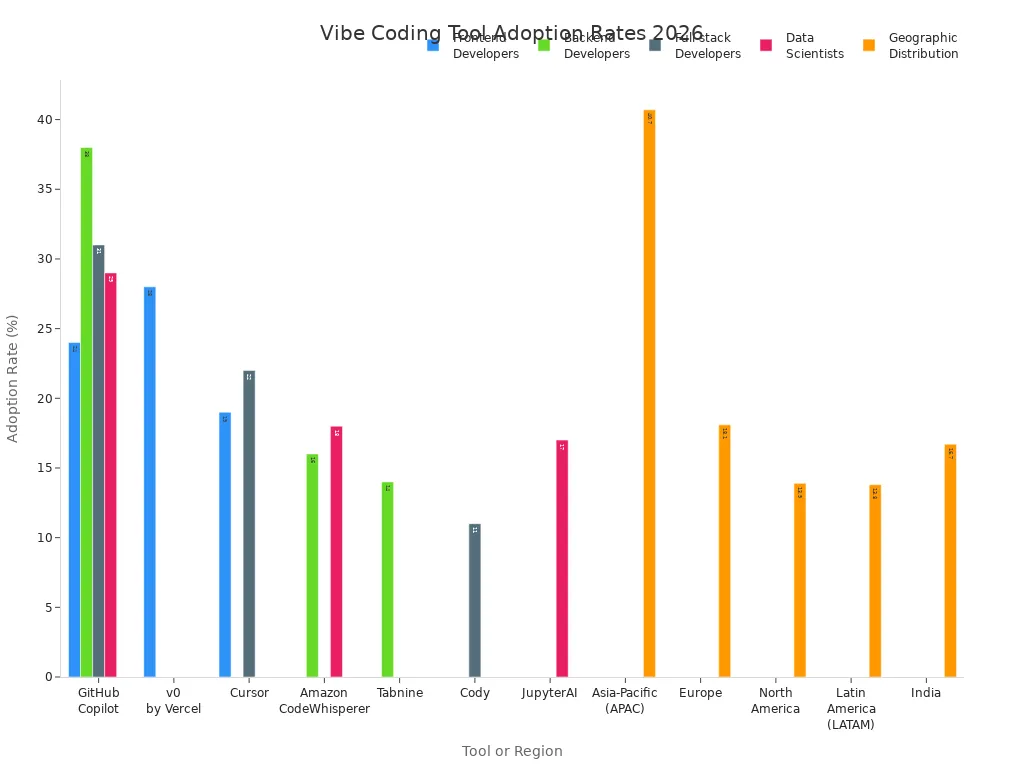
Think about what you need, your project type, and your budget as you explore.
Key Takeaways
Vibe coding tools let you use normal words. This makes coding easier and faster for developers. Tools like Replit and Bolt work well for people who code alone. Lovable and v0 by Vercel are good for small teams who want to work together. Softr helps people who are not developers make apps fast. Its no-code platform lets anyone build apps. AI features in tools like Cursor and Claude Opus 4.5 help you code better. They give smart tips and find bugs. Pick the right vibe coding tool for your project. Think about what you need, your money, and if you want speed, design, or teamwork.
Quick Comparison of Best Vibe Coding Tools
Use Cases, Pricing, Strengths
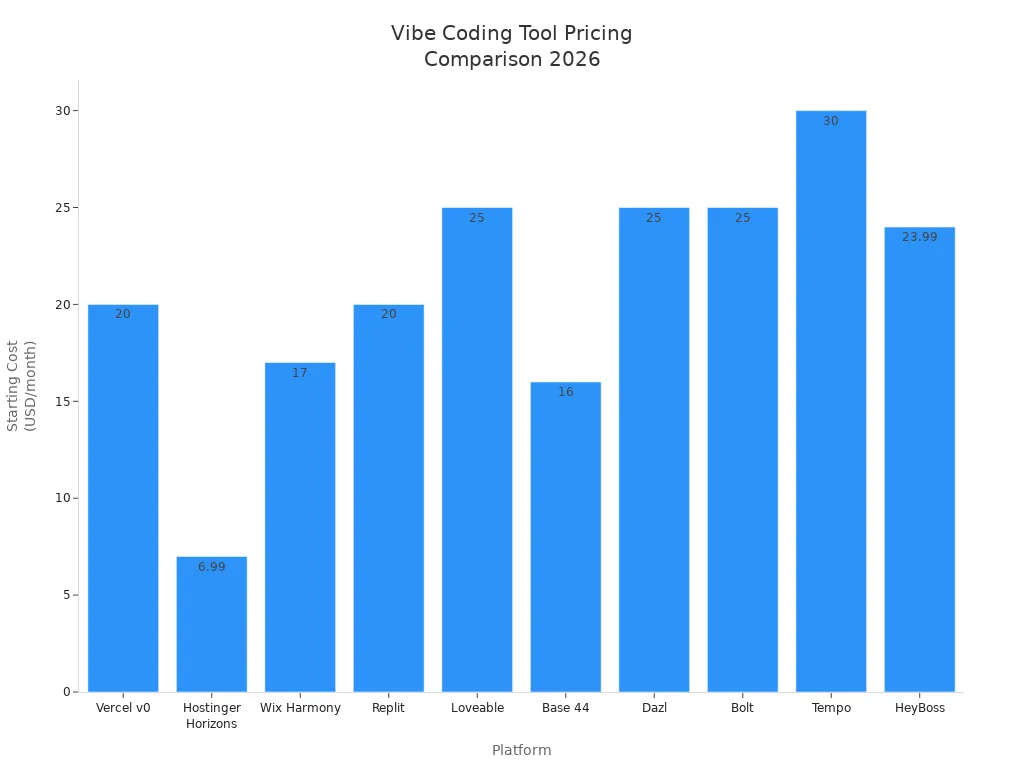
Do you want to know how these tools compare? Here is a table that shows the main use, starting price, and what makes each tool special:
Tool | Main Use Case | Starting Price | Key Strengths |
|---|---|---|---|
Vibe Coding Tools | AI-first coding, app building, automation | Custom | All-in-one suite, fast workflows, natural language |
Cursor | Smart AI code editing, repo management | Custom | Repo-aware agents, multi-file refactor, PR reviews |
Lovable | Rapid full-stack MVPs, chat-driven edits | $25/month | One-click deploy, GitHub sync, visual editor |
v0 by Vercel | React/Tailwind UI scaffolding for Next.js | $20/month | Generative UI, design mode, fast deployment |
Windsurf | Automated workflows, agentic IDE | Custom | First agentic IDE, workflow automation |
Replit | Idea-to-app platform, cloud IDE | $20/month | Generate, run, deploy in one place, built-in hosting |
Softr | No-code business app builder | Custom | Drag-and-drop, no coding needed, business focus |
Bolt | Lightning-fast deployment, prototyping | $25/month | Instant deploy, browser runtime, GitHub sync |
Claude Opus 4.5 | Advanced AI coding assistant | Custom | Deep code analysis, debugging, workflow automation |
Let’s look at it more closely:
Solo developers like using Replit and Bolt. These tools let you start fast and share ideas quickly.
Small teams choose Lovable or v0 by Vercel. They make it easy to work together and keep everyone updated.
Non-developers pick Softr. You can make apps without needing to code.
AI features are in many tools. Cursor has repo-aware agents, Lovable lets you edit with chat, and Claude Opus 4.5 helps with code analysis.
Deployment speed is important. Bolt and v0 by Vercel are great for instant deploys and live previews.
The best vibe coding tools help you build things faster, give you more choices, and make it easier for anyone to create something new. Choose the tool that fits your way of working and your project!
1. Vibe Coding Tools
Overview
If you want coding to feel easy and fun, try Vibe Coding Tools. This tool came out in 2026. It quickly became popular with developers, makers, and teams. You get AI-first editors, app builders, proxies, and Python/web stacks. You can build, scrape, and launch apps much faster. Many developers say these tools help them work smarter. They also enjoy coding more.
Features
Here are some things that make Vibe Coding Tools special in 2026:
Feature | Description |
|---|---|
Makes code from natural language descriptions. | |
Real-time Collaboration | Lets many developers work together at the same time. |
Enhanced Security Measures | Stops unsafe deployments and keeps your code safe. |
Voice-enhanced Coding | Lets you use your voice to write code for an easier workflow. |
You can use Willow for voice coding. Vercel v0 now gives a full frontend platform with UI generation and ready-to-use code.
Pros & Cons
You get fast workflows, natural language prompts, and strong security. Teams like working together in real time. You can code with your voice, which feels new and cool. Some people say these tools help them get more done and make coding more fun.
Pricing
Vibe Coding Tools have custom prices. You can pick a plan that works for you. Many teams think the cost is worth it. They build things faster and have fewer problems.
Best For
Developers who want AI-powered coding.
Teams who need to work together in real time.
Makers who want to launch apps quickly.
Anyone who wants the best vibe coding tools to get more done.
Recent stories show good results. Luke Burton used Vibe Coding Tools to upload CNC firmware with less trouble. Christine Hudson started coding again after a long break and exported Google Calendar entries easily. Adidas 700 developers got up to 30% more work done. Booking.com had smaller merge requests and happier workers.
2. Cursor
Overview
Cursor gives you a smart AI code editor that feels like a teammate. You can chat with an agent, get instant code suggestions, and handle big projects without stress. Cursor stands out because it understands your whole repo and helps you refactor, review, and fix code fast. If you want to save time and avoid mistakes, Cursor makes coding smoother.
Features
Check out what Cursor brings to your workflow:
Feature | Description |
|---|---|
AI Code Autocomplete | Suggests code as you type, boosting speed and accuracy. |
Handles complex tasks and talks in natural language through a chat panel. | |
Inline Edit Mode | Lets you select code blocks and make quick changes with instructions. |
AI Code Review with Bugbot | Reviews your code and helps with GitHub pull requests. |
Lightning-Fast Performance | Responds instantly and understands your whole codebase. |
Privacy You Can Trust | Processes code locally, keeping your work safe and secure. |
Tip: You can use Cursor for multi-file refactors and pull request reviews. The Bugbot feature checks your code and finds bugs before you merge.
Pros & Cons
Pros
You get repo-aware agents that know your project inside out.
The AI chat assistant helps you solve problems in plain English.
Cursor works fast and keeps your code private.
Inline edit mode lets you fix code without jumping between files.
Cons
You need to upgrade for full features if you use the free tier.
Pricing
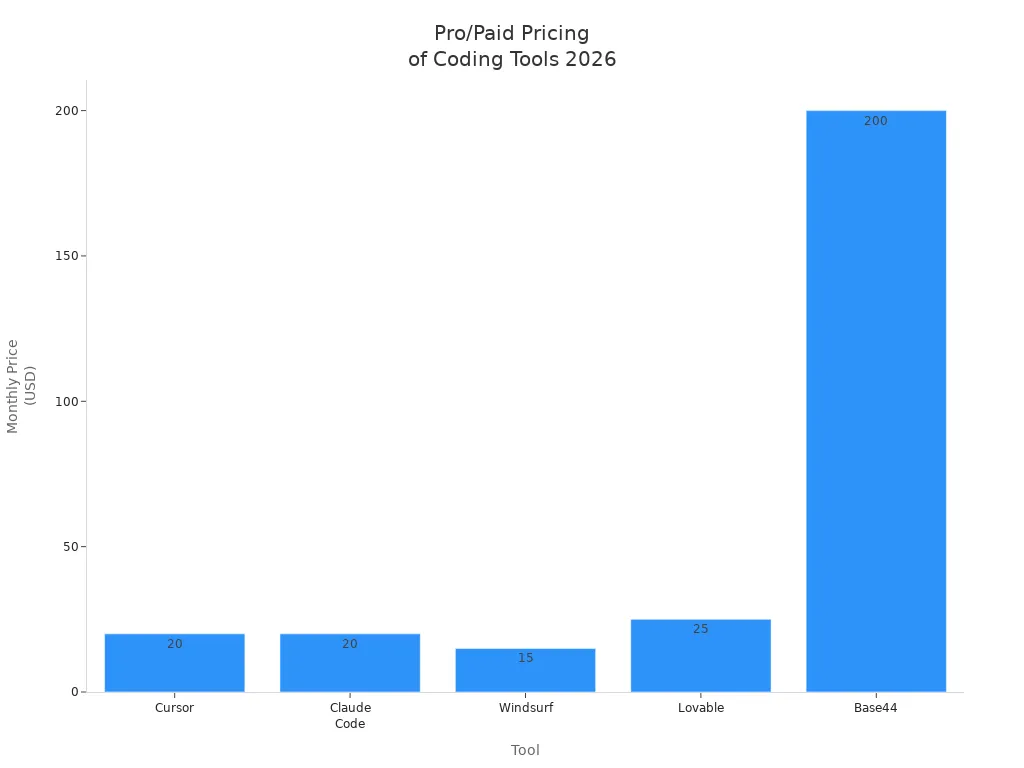
Cursor offers flexible pricing. You can start with a free tier for basic features. The Pro plan costs $20 per month. Enterprise pricing is custom. Cursor’s pricing matches other vibe coding tools like Lovable and Windsurf.
Tool | Free Tier | Pro/Paid | Enterprise |
|---|---|---|---|
Cursor | Yes (limited) | $20/mo | Custom |
Lovable | Yes (3 projects) | $25/mo | $100/mo |
Windsurf | Yes | $15/mo | $60/user/mo |
Best For
You want an AI code editor that understands your repo.
You need fast code reviews and bug checks.
You work on big projects and want to save time.
You care about privacy and security.
Cursor helps you code smarter and faster. If you want a tool that feels like a coding partner, Cursor is a great pick.
3. Lovable
Overview
Lovable feels like your own AI full-stack engineer. You can build apps just by chatting. The tool listens to your ideas and turns them into working projects. You don’t need to worry about wiring things up or setting up servers. Lovable helps you create MVPs and prototypes fast. You can use it for side projects or to test new ideas. Developers love how it saves time and makes coding fun.
Features
Lovable packs a lot of power into a simple interface. Check out what you get:
Feature LinkStart AI 레이더더 많은 AI 소식을 위해 텔레그램 커뮤니티에 참여하세요! | Description |
|---|---|
Makes modern designs from your words. | |
Supabase Integration | Gives you built-in backend for saving data. |
Real-Time Preview | Shows your app as you build it. |
Framework Export | Lets you export to popular frameworks for more control. |
Collaborative Editing | Lets you and your team work together at the same time. |
You can see your app come alive as you describe it. Lovable also connects with GitHub, so you can sync your code and keep everything organized.
Pros & Cons
Lovable helps you turn ideas into apps quickly. You get AI-driven development, real-time previews, and easy backend setup. You can work with friends or teammates. Some users say Lovable saves hours on setup and wiring. You can refine your output and export to frameworks if you want more control.
Pricing
Lovable starts at $25 per month for the Pro plan. You can try it for free with up to three projects. Teams can upgrade to the Enterprise plan for $100 per month. You get GitHub sync, visual editing, and one-click deployment.
Best For
You want to build MVPs and prototypes fast.
You need AI-driven app development.
You don’t want to code everything by hand.
You like working with teammates in real time.
You want to automate tasks and logic setup.
You have side projects and want to save time.
Lovable makes app building easy for everyone. You can start with an idea and end with a working app—all in one place.
4. v0 by Vercel
Overview
If you want to make web apps quickly, v0 by Vercel can help. This tool lets you build React and Tailwind UIs for Next.js projects in just a few minutes. You can make code that is ready for real use and put it online right away. v0 by Vercel is special because you can launch real apps, not just test versions. You get strong security and it works well with your current code. Even if you are not an engineer, you can add code using Git workflows.
Features
v0 by Vercel gives you a lot of tools in one place. Here are some things you get:
You can deploy in real time with Git workflows.
It has strong security for your projects.
It connects easily with your codebase.
You can make code that is ready for real users.
People who are not engineers can work together too.
Let’s see how v0 by Vercel compares to other vibe coding tools:
Feature | v0 by Vercel | Other Vibe Coding Tools |
|---|---|---|
Deployment Speed | Often focused on prototyping | |
Security | Enterprise-grade security built-in | May lack robust security features |
Integration with Codebases | Seamless integration with existing codebases | Limited integration capabilities |
Production Readiness | Generates production-ready code in real environments | Primarily for demos, not production-ready |
Collaboration | Non-engineers can ship production code via Git | Typically requires engineering involvement |
Pros & Cons
You can launch your app right away, keep it safe, and connect it to your code easily. v0 by Vercel lets you spend more time coding and less time on setup. Your app can grow by itself and reach people everywhere.
Here are some things developers like about v0 by Vercel:
Feature | Benefit |
|---|---|
Instant Deployment | |
Serverless Functions | Your app can handle lots of users without extra work. |
Edge Network | Your app loads fast for people all over the world. |
Automatic Scaling | Your app keeps working well, even when busy. |
Integration with Git | It helps teams work together and build faster. |
Pricing
You can start using v0 by Vercel for $20 each month. Teams and companies can get special prices for bigger needs. Many people think the price is good because you save time and get apps ready for real users.
Best For
You want to make and launch apps quickly.
You need code that is ready for real use.
You work with a team and want to work together easily.
You care about keeping your app safe and connected.
You want your app to grow without extra work.
v0 by Vercel helps you turn your ideas into real apps. You can spend more time coding and launching your project.
5. Windsurf
Overview
Windsurf brings a fresh vibe to coding in 2026. You get an agentic IDE that feels smart and responsive. Windsurf helps you automate workflows and manage projects with ease. You can use it for deep code analysis or quick edits. The tool learns how you code and adapts to your style. You feel like you have a coding partner that remembers your habits and helps you work faster.
Features
Windsurf packs a lot of power into a simple interface. You can use Cascade AI for deep codebase awareness. The Memories feature learns your coding patterns and makes suggestions that fit your style. Windsurf supports multiple models, including their SWE-1. You get advanced security and multi-IDE support. The Vibe and Replace feature lets you update code across files in seconds.
Here’s a quick look at Windsurf’s strengths:
Strengths | Details |
|---|---|
Most affordable premium option | |
Cascade AI | Deep codebase awareness |
Memories feature | Learns your coding patterns |
Multi-model support | Including their SWE-1 |
Pros & Cons
You get fast context switching, smart suggestions, and affordable pricing. Windsurf remembers your coding habits and helps you automate tasks. You can use advanced security to keep your code safe. The tool supports multiple IDEs, so you can work the way you like. Some users say Windsurf makes coding feel smoother and more personal.
Pricing
Windsurf offers flexible plans. You can start with a free tier that gives you 25 credits each month. The Pro plan costs $15 per month and gives you 500 credits. Teams pay $30 per user each month. Enterprise plans cost $60 per user each month. Windsurf gives you advanced security, multi-IDE support, and fast context switching. You get more features for less money compared to other vibe coding tools.
Feature/Plan | Windsurf Pricing | Cursor Pricing |
|---|---|---|
Free Tier | N/A | |
Pro | $15/month (500 credits) | N/A |
Teams | $30/user/month | N/A |
Enterprise | $60/user/month | N/A |
Features | Advanced security, multi-IDE support, Vibe and Replace, Fast Context | Basic autocomplete, single-file editing |
Best For
You want an affordable vibe coding tool.
You need deep codebase awareness.
You like tools that learn your coding style.
You work in teams and want advanced security.
You want to automate workflows and switch contexts fast.
Windsurf helps you code smarter and faster. You can focus on your ideas and let Windsurf handle the rest.
6. Replit

Overview
You want to turn your ideas into apps fast? Replit gives you a cloud-based IDE that feels familiar and powerful. You can code, test, and deploy—all in one place. Replit supports over 50 languages, so you can build anything from a simple script to a full-stack app. You get manual control, but you also get help from AI tools. Replit lets you work solo or with friends. You can start a project, invite teammates, and see changes live in your browser.
Features
Check out what makes Replit a favorite vibe coding tool:
Feature | Description |
|---|---|
Code-First, IDE-Based | You get a developer environment with terminal access and support for 50+ languages. |
AI Assistance, Not Automation | AI helps you code, but you stay in control. |
Manual, Fine-Grained Control | You can structure and debug your code your way. |
Full Project Lifecycle | Build, test, and deploy apps from start to finish. |
Production-Ready Software | Create custom apps, scripts, or full-stack projects. |
Deep Customization and Control | Add your own logic and connect third-party tools. |
Code Ownership and Portability | Export your code and host it anywhere. |
Automate coding, testing, and deployment with real-time teamwork. | |
Integrated Workspace | Work with AI, hosting, and teammates in one place. |
Design Import | Bring in designs from Figma or Bolt and generate code. |
Collaborative Coding | Co-author and debug with others live in the browser. |
Pros & Cons
Replit gives you freedom and flexibility. You can code your way, use AI for help, and work with friends. You get deep customization and control. You can export your code and host it anywhere. Some users love the real-time collaboration and design import features.
Pricing
Replit starts at $20 per month for the Pro plan. You can try basic features for free. Teams and enterprises can get custom pricing. You pay for what you need, and you get hosting, AI tools, and collaboration in one package.
Best For
You want to build and deploy apps fast.
You like coding with friends or teammates.
You need AI help but want manual control.
You want to customize your projects.
You care about code ownership and portability.
Replit makes coding feel easy and social. You can start a project, invite friends, and launch your app—all in one place. 🚀
7. Softr
Overview
Do you want to make apps without writing code? Softr lets you do that. Softr gives you a place to build business apps with a drag-and-drop editor. You do not have to be a developer. You can make dashboards, portals, and tools in just a few minutes. Softr helps you turn ideas into real apps very fast. Many people say Softr is easy and fun.
Features
Softr has many features that help you work better:
Drag-and-Drop Editor: You move blocks and build pages with your mouse.
AI Generation: AI can make layouts and workflows for you.
Native Integrations: You can connect to over 15 data sources like Airtable, Google Sheets, and Notion.
Real-Time Data Sync: You see updates right away from your connected sources.
Custom Branding: You can make your app look how you want.
User Management: You control who can see and use your app.
Here is how Softr is different from other vibe coding tools:
Feature/Aspect | Softr | Other Vibe Coding Tools |
|---|---|---|
User-Friendliness | Easy for non-tech users | Some are harder to use |
Setup Time | Quick setup, easy to learn | Usually takes longer to set up |
Customization Options | Drag-and-drop and AI generation | Some need coding to customize |
Integration Capabilities | Connects to 15+ data sources | Some have fewer integrations |
Learning Curve | Easy and fast for non-tech users | Some are harder to learn |
Real-Time Data Sync | Updates show up right away | Some need you to refresh by hand |
Advanced Customization | You can add more features if you want | Some need advanced features to work |
Pros & Cons
Softr lets you build apps fast. You do not need to code. You can connect to many data sources and see updates right away. The platform is simple for beginners. Some people say Softr saves them a lot of time every week.
Pros
Anyone can use it easily
Setup and launch are quick
Many ways to connect data
Updates happen in real time
You can change how your app looks
Cons
Some advanced features need a paid plan
Pricing
Softr has custom prices. You can start for free and pay later if you need more features. Many people think the free plan is good for small projects. Teams and businesses can pay for more options and connections.
Best For
You want to make apps without coding.
You need a tool that is easy and quick.
You work in a business and want special dashboards.
You like real-time updates and lots of ways to connect.
You want to control who uses your app.
Softr helps you make apps your way. You can start now and see results in just minutes. 🚀
8. Bolt
Overview
Bolt gives you a fast way to deploy apps. You can turn your ideas into live projects almost instantly. The platform uses AI-driven code generation, so you don’t have to wait long for your app to go live. You get a modern workspace that feels fresh and exciting. Bolt stands out because it makes deployment simple and quick. You can focus on your project and let Bolt handle the rest.
Features
Bolt brings a lot of cool features to the table. You notice the difference right away when you use it. Here’s what makes Bolt special:
Dynamic layout shifts that make your app look lively
Intentional hover animations for a smooth user experience
Modern design elements like rounded corners and clean forms
Subtle motion and depth that keep things engaging
Unique typography and bold color palettes that help your app stand out
You get a workspace that feels fun and easy to use. The design makes your app look professional without much effort.
Pros & Cons
Bolt helps you deploy apps fast. You get a workspace that looks modern and feels easy to use. The platform encourages creativity with its bold colors and unique layouts. You can make your app look different from others. Some users say Bolt makes them more productive because they spend less time on setup.
Pros
Rapid deployment with AI-driven code generation
Engaging design and smooth animations
Flexible workspace that adapts to your needs
Makes your app stand out visually
Cons
You need to pick a plan that fits your usage
Pricing
Bolt started with a simple monthly fee of $9, just like its predecessor. Now, you can choose from different plans based on how much you use Bolt. This gives you more flexibility. You can pick a plan that matches your workflow and budget.
Plan Type | Price | Best For |
|---|---|---|
Starter | $9/month | Solo developers |
Pro | Custom | Teams and frequent users |
Best For
You want to deploy apps quickly and easily
You like modern, engaging designs
You need a flexible workspace
You want your app to stand out from generic projects
You work solo or in a small team
Bolt helps you launch your ideas fast. You get a workspace that feels fresh and makes your app look great. 🚀
9. Claude Opus 4.5
Overview
Claude Opus 4.5 is one of the best vibe coding tools in 2026. It gives you a smart AI helper for hard coding problems. This tool works well for big projects and tricky tasks. Claude Opus 4.5 can handle lots of work and keeps your code safe. Many developers use it to plan, fix, and make their code better.
Features
Claude Opus 4.5 has many things that help you code. Here’s why it stands out:
Scored 80.9% on SWE-bench Verified, higher than GPT-5.1 and Gemini 3 Pro.
Can finish long tasks with good thinking and step-by-step actions.
Is strong against prompt injection attacks, with only 4.7% getting through.
Makes planning and changing projects easier with smart thinking.
Helps you write better code for real software.
You can count on Claude Opus 4.5 for smart help and safe coding.
Pros & Cons
You get a strong AI that learns what your business needs. Claude Opus 4.5 helps you do tasks, check code, and find mistakes. It works for people working alone or in teams. Some users say it makes coding easier and more trustworthy.
Pricing
Claude Opus 4.5 has prices that fit your needs. You can pick a plan for your team or how you work. Many developers think it is worth the money because it helps them do more and make fewer mistakes.
Best For
Aspect | Description |
|---|---|
FlowHunt lets you use Claude Opus 4.5 with your coding steps. | |
Automation Capabilities | Does content making, engineering jobs, and smart systems for you. |
Development Enhancements | Helps you write code, find bugs, and check your work. |
Agentic Task Execution | Handles hard goals and changes when things are new. |
Business Context Understanding | Knows about your data and builds answers for your business. |
Claude Opus 4.5 is great if you want an AI for hard coding, smart workflows, and safe projects. You get a tool that knows your goals and helps you reach them fast. 🚀
How to Choose the Best Vibe Coding Tool
Assessing Needs
You need to find the right tool for your work. First, think about what you want to do. Are you making a simple app or a fancy prototype? Here’s an easy way to pick:
Pick Bolt if you want a fast app that works.
Choose Lovable for a nice-looking prototype.
Try Replit if you want to learn and work with others.
Use Cursor for more control and deeper coding.
Tip: Ask yourself what you want most. Do you care about speed, design, or working with a team? Your answer will help you choose the best vibe coding tool for your project.
Matching to Projects
Different tools are good for different jobs and teams. Look at this table to see which tool fits your needs:
Tool Name | Target Audience | Features | Deployment | Best For |
|---|---|---|---|---|
Lovable | Startups, product teams, creatives | Chat-based AI coding, Figma integration | Cloud-hosted | Conversational workflow for app building |
v0 by Vercel | Designers, front-end teams | Prompt-based UI generator, templates | Cloud via Vercel | Design-heavy UI-first projects |
Bolt | Entrepreneurs, product makers | Conversational AI, prototyping | Cloud-hosted | Fastest idea-to-prototype |
CodeConductor | Large enterprises | Role-based access, encryption | Cloud-hosted | Security, compliance, scalability |
Replit | Small, mid-sized teams | Real-time collaboration | Cloud-hosted | Team coding, testing, deployment |
Cursor | Professional developers | Flexibility, AI assistance | Cloud-hosted | Hands-on coding experience |
You can see which vibe coding tool is best for solo workers, new companies, or big groups. Pick the one that fits your team and project.
Budget & Team Fit
Money is important when you pick a tool. Check the price now and think about future costs. Some tools save you time, but there might be extra costs like switching platforms or not being able to change things. Watch out for these:
Platform lock-in
Not many ways to customize
Costs if you switch tools later
Cost Vector | Description |
|---|---|
Direct labor time saved | Savings from generative tools |
Cost of refactors | Expenses if prototypes need rework |
Opportunity cost | Losses from delayed market entry |
Governance costs | Security and QA expenses |
Split your budget into steps. Start small with a test budget for vibe coding, then save more money for bigger projects that work well.
Set goals that match results. Pay for what gets done, not just for time spent.
Get help from vendors for short times if your team needs extra skills.
Remember, the best vibe coding tools help you save time and money, but you should plan for changes and growth.
You get a lot from the best vibe coding tools. Check out this quick table:
Tool | Advantages |
|---|---|
Claude | Finds bugs, mobile support, review flow |
Cursor | Edits with natural language, privacy mode |
Replit | Instant feedback, great for debugging |
Think about your workflow and what you need. Try free versions or demos like GitHub Copilot or Cursor AI. Stay updated by following tools like Cursor, Replit, Claude, and Lovable. You can listen to podcasts or read bulletins for new trends. Ready to build smarter? The future of coding is yours! 🚀
FAQ
What makes a coding tool a "vibe" tool?
You use natural language, not just code. Vibe tools let you prompt, guide, and test your apps in ways that feel easy and fun. You get faster results and less manual work.
Can beginners use vibe coding tools?
Absolutely! Many vibe tools, like Softr and Lovable, work for people who don’t know how to code. You drag, drop, or chat to build apps. You can start projects without feeling lost.
How do vibe coding tools help teams?
Real-time collaboration
Shared workspaces
Instant feedback
You and your teammates can build, review, and launch together. Everyone stays updated and works faster.
Are vibe coding tools expensive?
Tool | Free Plan | Paid Plan Starts |
|---|---|---|
Replit | Yes | $20/month |
Lovable | Yes | $25/month |
Windsurf | Yes | $15/month |
You can try most tools for free. Paid plans unlock more features.
Can I use vibe coding tools for business apps?
You can! Tools like Softr and Vibe Coding Tools let you build dashboards, portals, and custom apps. You connect data sources and manage users. Your business gets results fast.
See Also
A New Age of Vibe Coding Begins Now
Introducing Vercel's Latest Open Source Vibe Coding Tool
Best 10 AI Tools for TikTok Video Creation in 2025
Essential Tech Stack for Solo Developers: Figma and More
Jule: The AI Assistant Simplifying Software Development Tasks