


Looking for the best AI notetakers for meetings in 2026? Here are the top 10 you should know: Fathom, tl;dv, Grain, Granola, Limitless, Fireflies.ai, Otter.ai, MeetJamie, Avoma, and Sembly AI. You need these tools because they help you remember everything. They make you work better and let you pay attention to talking. More than 70% of companies use AI for meetings now. This is even more common in teams that work from home. The best AI notetakers are good at being correct, working fast, keeping things private, and connecting with other tools.
Key Takeaways
AI notetakers help meetings go better by writing down details. This lets you pay attention to the talk. Pick a tool that works for your team size and meeting type. This will give you the best results. Find features like real-time transcription and action item detection. These make follow-ups easier. Think about privacy and rules if you talk about private things. Try free plans to see which AI notetaker is best for you. Make sure it fits what you need.
1. Fathom
Features
You want a tool that makes meetings easier. Fathom does just that. It transcribes your meetings in 25 languages, so you can work with teams from all over the world. You get 14 different AI meeting summary styles. This means you can pick the summary that fits your needs best. Fathom also finds action items and sends follow-up emails for you. You do not have to worry about missing tasks. If you work with a team, you can use folders and comments to keep everyone on the same page. Fathom lets you search all your past meetings with a global search. If you use a CRM, higher plans let you sync your meeting notes right into your system.
Key features:
Transcription in 25 languages
14 AI summary styles
Automatic action items and follow-up emails
Team folders and comments
CRM sync (on higher plans)
Global search for past meetings
Pros & Cons
Here’s a quick look at what you might like and what you might not:
Pros | Cons |
|---|---|
Limited free plan features | |
Meeting recording | Bot joining meetings |
Automatic transcription | Connectivity issues |
Easy to use | Accuracy concerns |
Action items | Support delays |
Tip: If you want smooth teamwork, Fathom’s folders and comments help your group stay organized.
Pricing
You can start with Fathom’s free plan. It gives you basic meeting recording and transcription. If you want more, the Premium plan costs $15 per month. For teams, pricing starts at $19 per user each month. You can try the team plan free for 14 days. Some other tools may offer more features for less money, but Fathom’s free plan is generous for individuals.
Unique Aspects
Fathom stands out for its simplicity and ease of use. You do not need to be a tech expert to get started. It works well with Zoom, Google Meet, and Microsoft Teams. The free plan is great for individuals and small teams. Fathom focuses on making meetings simple and clear, which is why many call it one of the best AI notetakers for 2026.
2. tl;dv
Features
You want a meeting tool that does more than just record. tl;dv gives you high-quality video and audio for every meeting. You get industry-leading accuracy, so you can trust your notes. If you work with people from different countries, you will love that tl;dv supports over 30 languages. The AI-powered summarization helps you get the main points fast. You can connect tl;dv with your favorite business tools, like your CRM or project manager. The free plan lets you record and transcribe as many meetings as you want.
High-quality video and audio
Accurate transcriptions
Over 30 languages supported
AI-powered summaries
Integrates with business tools
Unlimited recordings and transcriptions on the free plan
Pros & Cons
You want to know what works well and what could be better. Here’s a quick look:
Pros | Cons |
|---|---|
High transcription accuracy | Technical glitches |
Meeting highlights | Free version limits |
Easy integration | Data privacy concerns |
You also get cool features like clip creation for sharing moments, insights for sales teams, and custom summary templates. Some users say the bot-based approach can bother privacy-focused clients. The UI takes time to learn, and support can be slow.
Pricing
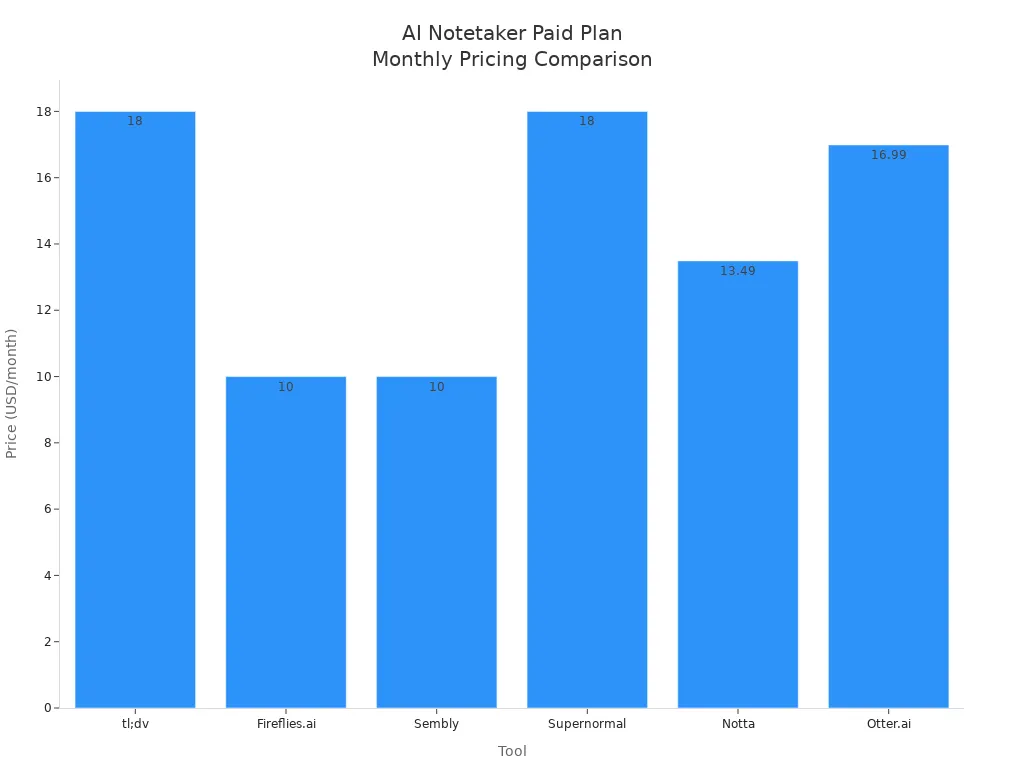
tl;dv gives you a free plan with unlimited recordings. If you want more, the paid plan starts at $18 per month. This is similar to other top tools. Here’s a quick look at how tl;dv compares:
Tool | Free Plan | Paid Plan From | Platforms Supported |
|---|---|---|---|
tl;dv | Unlimited recordings | $18/month | Zoom, Google Meet, Teams |
Fireflies.ai | Limited minutes | $10/month | Zoom, Google Meet, Teams, Webex |
Sembly | Limited minutes | $10/month | Zoom, Google Meet, Teams, Webex |
Supernormal | Limited credits | $18/month | Zoom, Google Meet, Teams |
Notta | 120 mins/month | $13.49/month | Zoom, Google Meet, Teams, Webex |
Otter.ai | 300 mins/month | $16.99/month | Zoom, Google Meet, Teams |
Unique Aspects
tl;dv stands out for its support of over 40 languages and custom meeting summaries. You can create summaries in different languages, which is great for global teams. If you want one of the best AI notetakers for multilingual meetings, tl;dv is a smart choice.
3. Grain
Features
Grain helps you turn long meetings into short, useful recaps. You can capture key moments and share them with your team in seconds. If you want to find something from a past meeting, just type a keyword and Grain will jump right to that spot. It supports 22 languages, so you can work with people from around the world. You can organize your recordings with #tags and keep everything in a shared video library. This makes it easy for your team to find and use important insights.
Key Feature | Description |
|---|---|
Share the most important parts of your meetings quickly. | |
Compress meetings | Turn a 60-minute meeting into a 3-minute highlight video. |
Keyword search | Find exact moments by typing keywords. |
Multilingual transcription | Transcribe meetings in 22 different languages. |
Organized recordings | Use #tags to sort and find recordings and highlights. |
Shared video library | Store, search, and access meeting insights anytime. |
You also get instant audio capture, quick text conversion, and easy integration with Zoom and Slack. These features help you and your team stay on top of every conversation.
Pros & Cons
You want to know if Grain fits your needs. Here’s a quick look:
Pros | Cons |
|---|---|
Lacks advanced sales features found in pricier tools | |
Works well with Zoom and Google Meet | Limited CRM integration options for some users |
Automates note-taking and follow-up tasks to save you time | May not offer deep analytics for sales strategies |
Tip: If you want to save time and keep your team in sync, Grain’s automation and sharing tools make meetings much easier.
Pricing
Grain offers a free plan with basic features, which is great if you’re just starting out. Paid plans start at $15 per user each month. Small businesses like Grain because it helps teams work together without spending a lot. You can try it out before you decide to upgrade.
Unique Aspects
Grain stands out for its smart CRM integrations. If you use Salesforce, HubSpot, or Pipedrive, Grain can sync meeting summaries and transcripts right to your deal records. This keeps your sales team organized and helps everyone follow up on tasks. You also get tools that turn call intelligence into action items, so nothing slips through the cracks. With Grain, you keep all your meeting insights in one place, making it one of the best AI notetakers for teams who want to stay connected and productive.
4. Granola
Features
Granola cares a lot about privacy. You do not need to worry about bots in your meetings. Granola does not use bots, so only real people join. It gives you live transcription, but it never records audio or video. This keeps your words safe from others. You can also choose if your data helps train AI or not. Granola works for in-person meetings too. If you need to follow privacy laws, Granola helps with GDPR rules. You can get a Data Processing Agreement, and your transcripts stay private.
Here’s a quick look at Granola’s privacy features:
Feature | Description |
|---|---|
No outside bots ever join your meetings. | |
No audio/video recordings | No one records, so your words stay secret. |
Opt-out of data training | You decide if your data helps train AI. |
Pros & Cons
You want to see if Granola is right for you. Here is a table to help you choose:
Pros | Cons |
|---|---|
No bots record meetings, so you feel comfortable | You cannot listen again to check details |
Transcription is very accurate (90-92%) | Hard to tell who is talking in big meetings |
Uses both people and AI for notes | No app for Android phones |
Focuses on privacy, follows GDPR, and works on your device | |
Simple to use and fast to start | |
Works for in-person meetings |
Tip: If you work in a job with strict rules, Granola’s privacy tools are a great choice.
Pricing
Granola makes pricing easy. You get a free plan for up to 25 meetings each month. The Pro plan costs about $14 for each user every month. If you have a big team, you can ask for special prices. Here is how Granola compares to another tool that cares about privacy:
Notetaker | Free Tier | Pro Plan Price | Enterprise Pricing |
|---|---|---|---|
Granola | ~$14/month/user | Custom Pricing | |
Jamie | 60 minutes/day | $16/month/user | Custom Pricing |
Unique Aspects
Granola is special because it protects your privacy and follows the rules. You get live transcription, but no audio is saved. You can ask for a Data Processing Agreement for GDPR. Transcripts are private, and you can say no to AI training. Granola works for in-person meetings, which many other tools do not. If you want a tool that keeps your words safe and follows strict rules, Granola is a smart pick.
Feature | Description |
|---|---|
Data Processing Agreement | You can get this for GDPR rules |
Anonymized Transcripts | Used for AI, but you can say no |
Real-time Transcription | Only notes are saved, not audio |
5. Limitless
Features
Limitless helps you pay attention in meetings. It takes notes for you while you listen. You see real-time transcription, so you catch every word. Before meetings, Limitless gets info from emails and chats. This helps you know what to expect. After your call, you get a summary and action items. You can use Limitless on your computer or phone. This makes it easy to keep up anywhere. Your data is safe because it uses encryption and cloud storage.
Here’s what Limitless gives you:
Feature | Description |
|---|---|
Meeting Preparation | Get ready with briefs that use info from emails and past meetings. |
Transcription | See real-time notes as people talk. |
Automated Note-taking | Let Limitless write your notes during meetings. |
Summaries | Receive short, clear recaps and action items after meetings. |
Confidential Data Protection | Your info stays safe with strong encryption and secure cloud storage. |
Multi-Platform Access | Use Limitless on web, Mac, Windows, and mobile devices. |
Pros & Cons
You want to know if Limitless is right for you. Here is a simple list:
Pros | Cons |
|---|---|
Real-time transcription | Free plan has limits |
Automated note-taking | Premium features cost more |
Pre-meeting briefs | |
Secure data protection | |
Works on many devices |
Tip: If you want to talk and let the tool do the rest, Limitless is a smart choice.
Pricing
Limitless has a free plan for light users. You get up to 50 million compute units each month for free. If you need more, the Scale Plan costs $19.99 per month. It gives you unlimited usage with no limits.
Plan | Features | Pricing |
|---|---|---|
Free Tier | Up to 50 million compute units per month | Free |
Scale Plan | Unlimited compute units, zero rate limits | $19.99/month |
Unique Aspects
Limitless is great for teams and automation. You and your team can edit notes together in real time. You can add comments and highlights to your notes. The AI finds key points and tasks for you. After meetings, you get summaries that help you remember what happened.
Real-time editing for teams
Comments and highlights in notes
AI-generated summaries before and after meetings
Automatic task extraction from conversations
If you want an AI notetaker for busy teams who need to stay organized, Limitless is a top pick.
6. Fireflies.ai
Features
You want a meeting helper that does more than record. Fireflies.ai is a smart AI notetaker that joins your meetings. It writes down everything people say. You can read the words on your screen as people talk. After the meeting, you get a short summary and a list of things to do. Fireflies.ai helps you get ready by putting important info together before meetings. You can also look at your own feed to see what your team talked about.
Here’s what Fireflies.ai gives you:
Feature | Description |
|---|---|
AI Notetaker | Writes down all meeting details for you |
Live Transcription | Shows what people say right away |
AI Summaries | Makes clear summaries after meetings |
Action Items | Finds and lists tasks from your talks |
Meeting Prep | Gets info ready so you can prepare |
Personalized Feed | Shows topics your team talked about |
Advanced Analytics | Tells you who talked most and team trends |
Rules Engine | Lets you pick who can see or join meetings |
User Groups | Shares meeting notes with certain teams |
Collaboration Tools | Makes sharing notes and tasks simple |
Soundbites | Makes short audio clips you can share |
Integrations | Works with over 60 apps like Slack and Google Docs |
Tip: If you want to save time and remember everything, Fireflies.ai helps you stay on track.
Pros & Cons
You want to know if Fireflies.ai is good for you. Here is a table to help you pick:
Pros | Cons |
|---|---|
Saves time by making notes and summaries | Can make mistakes if meetings are noisy |
Keeps all meeting records in one place | Does not support every language or dialect |
Shows key choices and next steps | Cloud storage might worry some about safety |
Makes it easy for teams to share notes | Needs the internet to work well |
Pricing
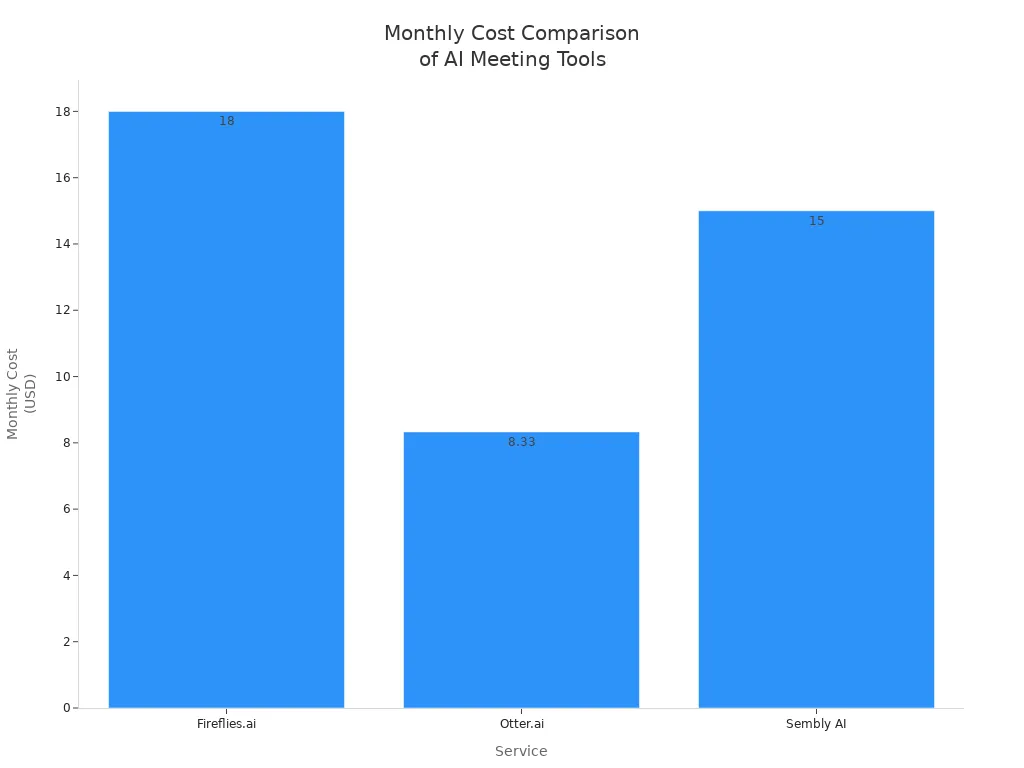
Fireflies.ai has a free plan with basic tools. If you want more, the Pro plan costs $18 for each person every month. This is more than Otter.ai and Sembly AI, but you get extra things like CRM and analytics. Teams that sell things or help customers like these features.
Service | Free Plan | Starting Paid Plan | Monthly Cost (Paid) |
|---|---|---|---|
Fireflies.ai | Yes | Pro | $18/seat |
Otter.ai | Yes | Pro | $8.33 |
Sembly AI | Yes | Professional | $15 |
Unique Aspects
Fireflies.ai is special because it connects with many apps and works fast. You can use it with over 60 apps, like Slack, Notion, and Google Docs. Fireflies.ai joins meetings on Zoom, Google Meet, Microsoft Teams, and GoToMeeting. You get meeting words right away and can search old meetings easily. The rules engine lets you pick who can see things, so your team’s info stays safe. If you want an AI notetaker that helps teams with smart tools and lots of connections, Fireflies.ai is a great pick.
7. Otter.ai
Features
Otter.ai helps you write down everything people say in meetings. You see words on your screen as people talk. This means you do not miss anything important. Otter.ai can tell who is talking, so you know who said what. You can share your notes with your team. You can also change and comment on the notes together. If you use Zoom or Google Meet, Otter.ai works with these apps. It writes down what people say for you. You can look for words in your notes by typing a keyword. This makes it easy to find what you need.
Feature | Description |
|---|---|
Real-time transcription | Shows live text as people speak. |
Speaker identification | Labels each speaker for clear tracking. |
Collaborative tools | Lets you share, edit, and comment on notes. |
App integrations | Works with Zoom and Google Meet for easy meeting capture. |
Searchable transcripts | Lets you find any word or topic fast. |
Tip: If meetings move fast, Otter.ai helps you keep up. The live words and speaker names help you stay neat and ready.
Pros & Cons
Otter.ai is good for people and teams. You can use it to take notes for yourself. You can also share notes with your group. Here is a quick list of what is good and what is not:
Feature | For Individuals | For Teams |
|---|---|---|
Direct messages | Private discussions | Team action item follow-up |
Folders | Organize personal notes | Structure team files |
Integrations | Sync with calendars | Connect with team tools |
AI chat | Manage personal tasks | Assign team tasks |
Comments | N/A | Tag teammates for feedback |
Recording | Capture personal meetings | Record team discussions |
Meeting notes | Email notes to yourself | Share notes with everyone |
Action items | N/A | Auto-create and assign tasks |
The free plan lets you take simple notes.
Live words save you time.
You can sort and find notes easily.
Good things for teams:
Working together is easier with sharing tools.
The tool makes task lists for your group.
It works with other apps you use.
Not so good:
You cannot change notes a lot.
Big teams may think it costs too much.
Pricing
Otter.ai has a plan for everyone. You can start with the free Basic plan. It gives you 300 minutes of notes each month. The Pro plan costs $8.33 each month if you pay for a year. You get 1,200 minutes with this plan. If you need more, the Business plan is $20 each month. It gives you 6,000 minutes. Students and teachers like Otter.ai because it helps them learn. The tool takes notes for them. You can search your class notes later. This makes studying much easier.
Plan | Monthly Cost (Annual Billing) | Monthly Minutes | Max Duration Per Recording | Best For |
|---|---|---|---|---|
Basic | Free | 300 | 30 minutes | Short meetings, casual users |
Pro | $8.33 | 1,200 | 90 minutes | Students, frequent meetings |
Business | $20 | 6,000 | 4 hours | Teams, researchers, long calls |
Unique Aspects
Otter.ai is special because it helps everyone join meetings. You get words on your screen as people talk. This helps if you cannot hear well. If you have trouble listening, Otter.ai’s words make meetings easier. Many students who have a hard time paying attention use Otter.ai. The tool helps you look back at your notes and study. These things make Otter.ai one of the best AI notetakers for people who want easy and helpful tools.
8. MeetJamie
Features
MeetJamie helps you capture every detail in your meetings. You get real-time transcription that works in over 15 languages. The tool creates smart summaries, so you can review the main points fast. You can highlight important moments with just one click. MeetJamie also finds action items and decisions for you. If you want to share notes, you can send them to your team right away. The tool works with Zoom, Google Meet, and Microsoft Teams. You can use it on your computer or phone.
Key features:
Real-time transcription in 15+ languages
One-click highlights for key moments
Automatic action item and decision detection
Smart meeting summaries
Easy sharing with your team
Integrates with popular meeting platforms
Tip: Try using the highlight feature during your next call. You will save time when you review your notes later.
Pros & Cons
You want to know if MeetJamie fits your needs. Here is a quick look:
Pros | Cons |
|---|---|
Fast and accurate transcription | Free plan has limits |
Finds action items automatically | Some features need a paid plan |
Works with many meeting platforms | Mobile app still improving |
Easy to share notes |
Pricing
MeetJamie gives you a free plan with basic features. You can record up to 60 minutes each day. The Pro plan costs $16 per user each month. This plan gives you longer recordings, more languages, and advanced summaries. If you have a big team, you can ask for custom pricing.
Pricing at a glance:
Free: 60 minutes per day
Pro: $16/user/month
Enterprise: Custom pricing
Unique Aspects
MeetJamie stands out because it focuses on speed and accuracy. You get meeting notes almost right away. The tool uses AI to find action items and decisions, so you do not miss anything. MeetJamie also cares about privacy. Your data stays safe with strong security. If you want one of the best AI notetakers for teams who need fast results, MeetJamie is a smart choice.
9. Avoma
Features
Avoma helps you get more out of every meeting. You can record, transcribe, and summarize calls with just a few clicks. The tool works with Zoom, Google Meet, Microsoft Teams, and Webex. You can see live notes during meetings. Avoma also finds action items and questions, so you never miss a follow-up. You can search all your past meetings by keyword. The tool lets you share notes with your team right away. Avoma connects with tools like Salesforce, HubSpot, Slack, and Asana.
Main features:
Meeting recording and live transcription
AI-powered summaries and action items
Searchable meeting library
Real-time note sharing
Integrations with top business apps
Tip: Use Avoma’s search tool to find key moments from old meetings in seconds.
Pros & Cons
You want to know if Avoma fits your team. Here’s a quick look:
Pros | Cons |
|---|---|
Easy to use for all team members | Free plan has limits |
Finds action items and questions fast | Some features need paid plans |
Works with many meeting platforms | Interface can feel busy |
Great for sales and customer teams |
Pricing
Avoma gives you a free plan with basic features. You can try meeting recording and summaries without paying. If you need more, the Starter plan costs $19 per user each month. The Plus plan is $39 per user each month and adds CRM sync and advanced analytics. Teams can ask for custom pricing if they need more options.
Pricing at a glance:
Free: Basic recording and notes
Starter: $19/user/month
Plus: $39/user/month
Custom: For large teams
Unique Aspects
Avoma stands out because it helps both sales and customer success teams. You get AI coaching insights that show how you can improve your calls. The tool tracks talk time, questions, and topics. You can see trends and learn what works best. Avoma also lets you set up templates for meeting notes. This saves you time every week. If you want one of the best AI notetakers for teams who want to learn and grow, Avoma is a smart choice.
10. Sembly AI
Features
You want a notetaker that does more than just write down words. Sembly AI listens to your meetings and turns them into smart summaries. You get real-time transcription in over 40 languages. Sembly AI finds action items, decisions, and key topics for you. You can search your meeting notes by typing a keyword. The tool works with Zoom, Google Meet, Microsoft Teams, and Webex. You can share notes with your team right away.
Top features:
Real-time transcription in 40+ languages
AI-powered summaries and highlights
Automatic detection of action items and decisions
Keyword search for meeting notes
Integrations with popular meeting platforms
Team sharing and collaboration
Want to save time? Sembly AI’s smart summaries help you focus on what matters most.
Pros & Cons
You need to know if Sembly AI fits your needs. Here’s a quick look:
Pros | Cons |
|---|---|
Accurate transcription | Free plan has limits |
Finds action items automatically | Some features need paid plans |
Works with many platforms | Interface can feel busy |
Easy sharing and collaboration |
Pricing
Sembly AI gives you a free plan with basic features. You can record and transcribe up to four meetings each month. The Professional plan costs $15 per user each month. Teams can choose the Team plan for $25 per user each month. If you need more, you can ask for custom pricing.
Pricing at a glance:
Free: 4 meetings/month
Professional: $15/user/month
Team: $25/user/month
Enterprise: Custom pricing
Unique Aspects
Sembly AI stands out because it helps you find important moments fast. The tool uses AI to spot decisions and tasks. You can search your notes and get instant answers. Sembly AI supports over 40 languages, so global teams can use it. If you want a notetaker that makes meetings simple and clear, Sembly AI is a smart choice.
Try Sembly AI if you want to turn your meetings into easy-to-read summaries and actionable tasks. 🚀
Comparison of Best AI Notetakers
Feature Overview
You want to see what makes each tool different. This table shows the best AI notetakers side by side:
Tool | Languages | Real-Time Transcription | Action Items | Privacy Focus | Unique Aspect |
|---|---|---|---|---|---|
Fathom | 25 | Yes | Yes | Moderate | 14 summary styles |
tl;dv | 40+ | Yes | Yes | Moderate | Multilingual summaries |
Grain | 22 | Yes | Yes | Moderate | Video highlights, CRM sync |
Granola | 10+ | Yes | No | High | No bots, no recordings |
Limitless | 15+ | Yes | Yes | High | Pre-meeting briefs |
Fireflies.ai | 30+ | Yes | Yes | Moderate | 60+ integrations |
Otter.ai | 10+ | Yes | Yes | Moderate | Speaker ID, education focus |
MeetJamie | 15+ | Yes | Yes | High | Fast summaries, privacy |
Avoma | 10+ | Yes | Yes | Moderate | Coaching insights |
Sembly AI | 40+ | Yes | Yes | Moderate | Decision detection |
Tip: If you care about privacy, Granola and MeetJamie are good choices. For sales or CRM, Grain and Avoma work well.
Pricing Comparison
You probably want to know the price for each tool. This table makes it easy:
Tool | Free Plan | Paid Plan (from) |
|---|---|---|
Fathom | Yes | $15/user/month |
tl;dv | Yes | $18/user/month |
Grain | Yes | $15/user/month |
Granola | Yes | ~$14/user/month |
Limitless | Yes | $19.99/user/month |
Fireflies.ai | Yes | $18/user/month |
Otter.ai | Yes | $8.33/user/month |
MeetJamie | Yes | $16/user/month |
Avoma | Yes | $19/user/month |
Sembly AI | Yes | $15/user/month |
Note: Otter.ai starts at the lowest price for paid plans. Most tools let you use basic features for free.
Integrations
You want your notetaker to work with apps you use. Here is what you get:
Fathom, tl;dv, Fireflies.ai, Avoma, Sembly AI: Work with Zoom, Google Meet, Teams, and CRMs.
Grain: Connects with Salesforce, HubSpot, and Slack.
Granola, MeetJamie, Limitless: Focus on privacy, so they have fewer integrations.
If you need many integrations, Fireflies.ai and Avoma are great picks. For privacy, Granola is the best choice.
Which Tool Fits Your Needs?
Sales and CRM: Grain, Avoma
Multilingual Teams: tl;dv, Sembly AI
Privacy: Granola, MeetJamie
Education: Otter.ai
Team Collaboration: Limitless, Fireflies.ai
You can find the best AI notetaker for your team and meeting style. Try a few and see which one works best for you.
Choosing the Best AI Notetaker
Team Size
Think about your team. Do you work alone, or do you have a big group? If you’re solo, you might want a simple tool with a free plan. Small teams often like easy sharing and basic collaboration. Large teams need advanced features, like user management and team folders. Some tools, like Fathom and Otter.ai, work well for both small and big groups. Always check if the tool lets you add or remove users easily.
Meeting Types
Not all meetings are the same. You might have quick check-ins, long workshops, or sales calls. Some AI notetakers do better with certain meetings. For example:
Sales teams like tools that find action items and connect with CRMs.
Teachers and students want live transcription and easy sharing.
Teams with lots of brainstorming need highlight and summary features.
Pick a tool that matches your main meeting style. Try to test it in a real meeting before you decide.
Integration Needs
You probably use other apps every day. Maybe you use Zoom, Google Meet, Slack, or a CRM. The best AI notetakers connect with these tools. Look for easy integrations. This saves you time and keeps your notes in one place. If you use many platforms, check if the notetaker supports them all. You can find this info on the tool’s website or in the comparison table above.
Privacy & Compliance
Privacy matters, especially if you talk about sensitive topics. Some tools focus on privacy and follow rules like GDPR. Granola and MeetJamie are good for strict privacy needs. Always check if you can control who sees your notes. Look for features like data encryption and user permissions. If you work in healthcare or law, ask about compliance before you choose.
Tip: Try the free version first. See if the support team answers your questions. Good support makes a big difference when you need help.
You now know the best AI notetakers for meetings in 2026. These tools help you capture every detail and boost productivity.
If you work in a team, pick a tool with strong collaboration features.
Individuals can try free plans to find what fits best.
Sales and education users should look for integrations and real-time transcription.
Check your needs, test a few options, and stay curious about new AI notetaker trends. 🚀
FAQ
How do AI notetakers work?
AI notetakers listen to meetings and write down what is said. They change talking into written words. You get short summaries and lists of things to do. You can search your notes and share them with your team.
Are AI notetakers safe to use?
Most AI notetakers use special codes to keep your data safe. Your information stays private. Some tools let you pick who can see your notes. Always look at privacy settings before you use a tool.
Can I use AI notetakers for in-person meetings?
Yes, you can use AI notetakers for in-person meetings. You only need to upload audio or use live transcription. Granola and Otter.ai have this feature.
Which AI notetaker is best for teams?
If you work with a group, try Fireflies.ai or Limitless. These tools let teams work together in real time. You can use team folders and share notes easily. Everyone can edit notes at the same time.
Do AI notetakers support different languages?
You can use AI notetakers in many languages. Tools like tl;dv and Sembly AI work with more than 40 languages. Always check the language list before you choose a tool.
See Also
Which Platform Dominates AI Team Event Planning: TeamOut, Cvent, or Nowadays?
NotebookLM Surpasses Classic Note-Taking Apps with Three Key Innovations
Comparing ACE Studio 2.0 and Suno AI: Best Music Tool 2026
Streamlining Event Planning with AI Agents: TeamOut, Slack, Google Calendar
Are TeamOut's AI Agents Capable of Replacing Human Event Planners?