Comparing Features of Two AI Assistants
Explore the key differences between OpenClaw and Composer 2.
Features | OpenClaw | Composer 2 |
|---|---|---|
Deployment | Runs on your own device | Operates in the cloud |
Privacy Control | Full user control over data | Platform-managed privacy |
Highly customizable with plugins | Medium customization for coding | |
Integration | Works with chat apps and tools | |
User Experience | Chat-based personal assistant | Coding-focused interface |
Performance | Fast for daily tasks | Super fast for coding tasks |
Cost Structure | No token fees, hardware costs | Token-based pricing model |
Best For | Privacy and personal automation | Coding efficiency and teams |
If you care about privacy and want to control your AI assistant, OpenClaw is the best option. You can control it on your own computer. It is easy to change and has strong privacy tools. But if you want great coding and a cheaper choice, Composer 2 is fast and accurate. Pick OpenClaw for privacy and to add more features. Choose Composer 2 if you are a developer who wants coding power and to save money.
Key Takeaways
OpenClaw keeps your data safe. It runs on your own device. This is good for people who care about privacy.
Composer 2 helps you code faster. It gives quick and correct coding help. This is great for developers who want to save time.
OpenClaw lets you change it to fit your needs. You can add skills and plugins. This makes the assistant work just for you.
Composer 2 uses a token system for pricing. You pay only for what you use. This makes it cheaper for coding projects.
Both assistants do different things. Pick OpenClaw for privacy and personal use. Choose Composer 2 for coding and working with teams.
OpenClaw And Composer 2 Overview
OpenClaw Features
OpenClaw lets you be in control of your AI assistant. You can use it right on your own computer. You do not have to trust a cloud service with your data. OpenClaw works with chat apps like WhatsApp, Telegram, and Discord. You can check your calendar, send emails, and clean your inbox in your chat app.
Runs on your own device
Keeps your information safe
Works with lots of chat apps
Lets you change skills and plugins
Remembers what you like with memory
Simple to set up with one command
Tip: You can add new features to OpenClaw. If you like to build things, you will have fun making it your own.
Composer 2 Features
Composer 2 helps you code faster and better. It gives you strong coding help for a good price. Composer 2 does well on coding tests, so you can trust it with hard jobs. It can handle long coding times and big projects easily.
Gives fast and correct coding help
Has good prices for tokens
Is great at hard coding problems
Has a fast version for quicker answers
Works with Cursor’s usage pool
Good for people working alone or in teams
If you spend a lot of time coding, Composer 2 makes your job easier and faster. You can count on it for smart ideas and quick fixes.
Performance And Usability
Speed And Efficiency
You want your AI assistant to be quick. Composer 2 stands out when you need fast answers for coding. It handles big projects and long tasks without slowing down. You can pick a high-speed version if you want even faster results. This helps you finish work on time and keeps you moving forward.
OpenClaw works well for daily tasks. It runs on your own device, so you do not wait for a cloud server. You get answers right away for things like checking your calendar or sending a message. If you care about privacy and want to keep your data close, this speed feels just right.
Tip: If you work with lots of code, Composer 2 saves you time. For personal tasks, OpenClaw gives you quick help without sending your data anywhere.
User Experience
How does it feel to use each tool? Composer 2 gives you a smooth ride if you spend your day coding. The interface is simple. You get smart suggestions and fixes that make sense. You do not need to jump through hoops to get help. Teams and solo developers both find it easy to use.
OpenClaw feels like a personal helper. You talk to it in your favorite chat app. You can ask it to do things, and it remembers what you like. You can add new skills or change how it works. This makes it feel like your own assistant, not just another tool.
Here’s a quick look:
Feature | OpenClaw | Composer 2 |
|---|---|---|
Speed | Fast for tasks | Super fast for code |
Customization | High | Medium |
User Interface | Chat-based | Coding-focused |
You get to pick what matters most to you—speed for coding or a personal touch for daily tasks.
Extensibility And Integration
OpenClaw Customization
You get a lot of freedom with OpenClaw. You can shape your assistant to fit your needs. OpenClaw lets you add “skills,” which are plugins that help the agent do things like manage calendars, run code, or analyze data. The community keeps building new skills, so you always find fresh ways to use your assistant.
You can automate tasks, like sending emails or checking your schedule.
LinkStart AI Radar
Join our Telegram community for more AI updates!
You personalize your assistant by giving details like your name, workplace, and work hours.
OpenClaw remembers your preferences, so you don’t have to repeat yourself.
You test and set up integrations with tools, making your assistant work for you.
Note: When you customize OpenClaw, you boost your productivity. You spend less time on routine tasks and more time on what matters.
Composer 2 Integrations
Composer 2 focuses on coding. You get strong integration with development tools. Composer 2 works well inside Cursor, so you can use it for coding projects, bug fixes, and code reviews. You can connect it to your workflow and get fast help with programming.
Composer 2 fits right into your coding environment.
You can use it for solo projects or team work.
It handles big coding tasks and gives smart suggestions.
You get access to a usage pool, so you don’t worry about limits.
Tip: If you want to speed up your coding and keep everything in one place, Composer 2 makes it easy.
Both assistants let you change how you work. OpenClaw gives you more ways to personalize your assistant and automate daily tasks. Composer 2 helps you code faster and keeps your workflow smooth. You pick the one that matches your style.
Security And Privacy
Data Control With OpenClaw
You want your data to be safe and private. OpenClaw lets you control your data because it runs on your computer. You do not need to send your info to a cloud server. You get to choose what your assistant can see and remember. This makes many people feel safe, especially if they care about privacy.
But OpenClaw had a security check by Cisco. The check found some problems. There were thousands of AI agent copies with no password. There were also hundreds of weak spots and API keys not hidden. Some of these problems could let someone else run code on your computer. If you use OpenClaw, you should watch for updates and fix problems fast. Staying careful helps keep your assistant safe.
Note: OpenClaw gives you strong privacy, but you need to watch out for security.
Composer 2 Security
Composer 2 works to keep your coding projects safe. You use it inside Cursor, which controls who can get in and keeps your work safe. Composer 2 does not run on your own computer. You trust Cursor’s cloud to protect your data. You do not have to worry about problems on your own device, but you trust the platform to keep things safe.
Composer 2 uses tokens for pricing, so you know how much you use. Teams and people working alone can set limits and check what is happening. You get a safe place to code, and the platform takes care of updates and fixes.
Here’s a quick comparison:
Security Feature | OpenClaw (Local) | Composer 2 (Cloud) |
|---|---|---|
Data Control | Full user control | Platform-managed |
Privacy | High (local storage) | Depends on platform |
Security Updates | User-managed | Platform-managed |
Vulnerability Risk | Needs user attention | Platform responsibility |
You get to pick what is most important to you: full control and privacy with OpenClaw, or easy security and help from Composer 2.
Cost Comparison
OpenClaw Pricing
You want to know what you’ll pay for your AI assistant. OpenClaw stands out because you run it on your own device. You don’t pay for tokens or cloud storage. Most costs come from your hardware and any extra plugins you add. If you use advanced models like Opus, Sonnet, or Haiku, you might see extra fees. These models charge per million tokens and add a “context tax” for each turn.
Here’s a quick look at model costs:
Model | Cost per M Tokens | Context Tax Cost per Turn |
|---|---|---|
$5 | $0.015 - $0.07 | |
Sonnet 4.5 | $3 | $0.009 - $0.04 |
Haiku 4.5 | $1 | $0.003 - $0.014 |
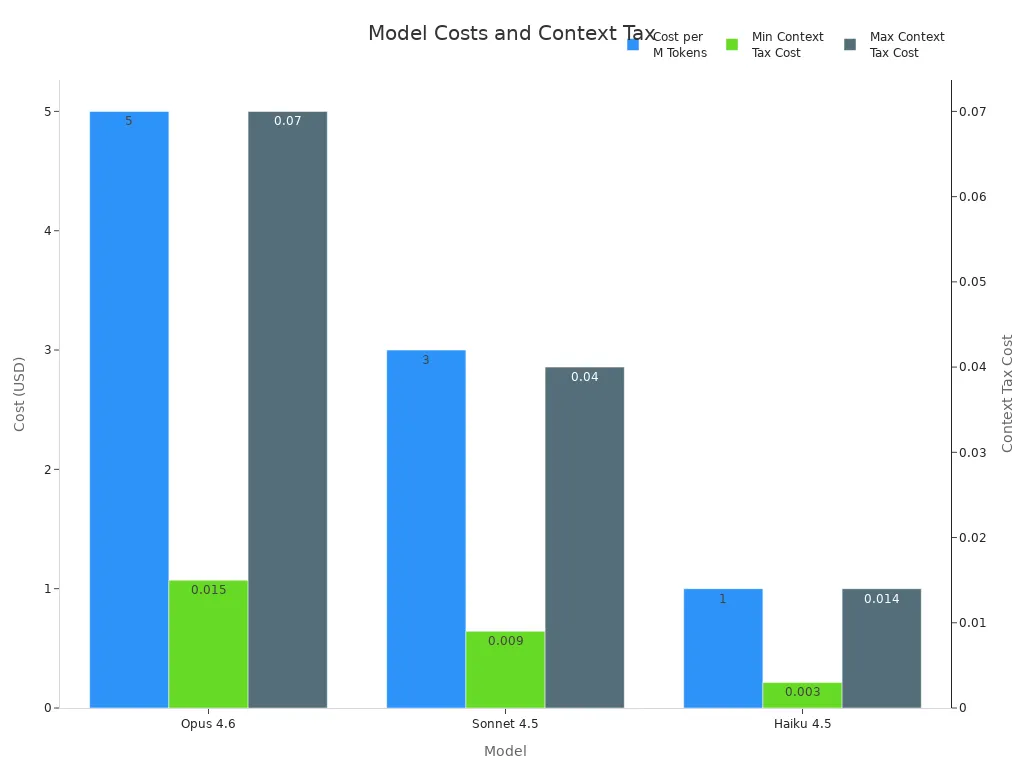
You can forecast your spending based on how much you use the assistant. The pricing model scales with your actual usage. If your team grows, costs don’t double. They rise only as you use more features.
Note: You control your costs with OpenClaw. You decide which models and plugins to use.
Composer 2 Pricing
Composer 2 uses a token-based pricing system. You pay for input and output tokens. The standard version costs $0.50 per million input tokens and $2.50 per million output tokens. If you need faster answers, the fast version costs $1.50 per million input tokens and $7.50 per million output tokens.
Model | Input Token Price | Output Token Price |
|---|---|---|
$0.50 per million | $2.50 per million | |
Composer 2 Fast | $1.50 per million | $7.50 per million |
Composer 2’s pricing scales with usage. You don’t pay more just because your team gets bigger. You pay for what you use. This makes it easy to predict costs and manage your budget.
You pay only for the tokens you use.
Costs grow with your workflow, not your team size.
No hidden fees or surprise charges.
Tip: If you want to keep costs low and know exactly what you’re spending, Composer 2 gives you clear pricing.
Both assistants offer flexible pricing. OpenClaw lets you control costs by picking models and plugins. Composer 2 gives you a simple token system that scales with your usage. You get to choose which fits your budget and workflow.
OpenClaw vs Composer 2 Table

You might want to know how these two AI assistants are different. This table helps you compare them quickly. You can see what is important in just a few seconds.
Feature / Metric | OpenClaw | Composer 2 |
|---|---|---|
Where It Runs | On your own device | In the cloud (Cursor platform) |
Privacy | Full control, local storage | Platform-managed |
Customization | High, add skills and plugins | Medium, coding-focused |
Integration | Chat apps, smart home, tools | Coding tools, team workflows |
User Experience | Chat-based, personal touch | Coding interface, smart fixes |
Performance | Fast for daily tasks | Super fast for coding |
Coding Benchmark (Terminal-Bench 2.0) | No direct score | |
Cost Structure | Pay for models/plugins, no token fees | Token-based, pay per use |
Cost per million input tokens | $5 (Opus 4.6) | $0.5 (standard), $1.5 (fast) |
Cost per million output tokens | $25 (Opus 4.6) | $2.5 (standard), $7.5 (fast) |
Security Updates | User-managed | Platform-managed |
Best For | Privacy, personal automation | Coding, developer teams |
Tip: OpenClaw is good if you want privacy and control. Composer 2 is better if you want fast coding and lower costs.
This table makes it easy to choose the right assistant for you. You can see what each one does best. Pick the one that fits how you like to work.
Tradeoffs And Limitations
OpenClaw Tradeoffs
When you pick OpenClaw, you get privacy and control. You also face some challenges. Many users say the setup can feel tough. You might need strong technical skills to get everything working. If your computer is not powerful, OpenClaw can run slow. You may spend extra time fixing things or keeping the system up to date.
Here are some common tradeoffs you should know:
The setup process can be complex and may require technical knowledge.
Weak hardware can make OpenClaw sluggish.
You might spend a lot of time on configuration and maintenance.
Security concerns can pop up, especially if you do not update often.
Some users have stopped using OpenClaw because of security worries.
You need to balance how easy it is to use with how safe your data stays.
Note: If you want full control, you must accept these challenges. OpenClaw gives you power, but you need to stay alert and ready to solve problems.
Composer 2 Tradeoffs
Composer 2 shines when you want fast and smart coding help. Still, you should know about its limits. Some users question the benchmarks Composer 2 uses. They want to see results from standard tests like HumanEval or Codeforces. This makes some people unsure about how well Composer 2 really performs.
You may also notice changes in how Composer 2 works. Sometimes, you lose control over things like terminal allow-lists. The interface can change as new features roll out. This focus on new tools can make the system feel less stable.
Here are some things to keep in mind:
Benchmark transparency is a concern for some users.
You might lose some control over certain features.
Composer 2 can lose track of context in large codebases, just like other AI coding tools.
Tip: If you want the latest features and fast coding, Composer 2 is a strong choice. Just remember, you may trade some stability and control for speed and new tools.
Best Use Cases
When To Choose OpenClaw
You want an AI assistant that feels like your own. OpenClaw works best when you care about privacy and want to keep your data on your computer. If you like to customize your tools, OpenClaw gives you that power. You can add new skills and plugins to make it fit your life.
OpenClaw shines in these situations:
You need help with email and calendar management. OpenClaw can read your inbox, draft replies, and handle invites. You spend less time on routine messages.
You use chat apps like WhatsApp, Telegram, or Discord. OpenClaw connects to these platforms, so you can send messages or manage social posts without switching apps.
You want to organize your files and folders. OpenClaw can run commands to clean up your computer, sort documents, or even automate backups.
You do a lot of web research. OpenClaw gathers information, checks prices, and scrapes data from websites while you focus on other things.
You like automation. OpenClaw runs in the background and handles tasks while you work or relax.
You want deep integration with your operating system. OpenClaw can control smart home devices, manage GitHub projects, and automate daily chores.
Tip: If you want to turn boring tasks into smart routines, OpenClaw is your best friend. You get more time for creative work and less stress from busywork.
When To Choose Composer 2
You spend your day coding or working with software projects. Composer 2 is made for you. It gives you fast, smart help with code. You get suggestions, bug fixes, and even help with big projects.
Composer 2 fits best when:
You want to boost your coding speed. Composer 2 gives you quick answers and smart code completions.
You work on complex coding problems. Composer 2 handles long tasks and big codebases with ease.
You care about cost. Composer 2 uses a clear token system, so you know what you pay for.
You work alone or with a team. Composer 2 fits both styles and keeps everyone on track.
You want a tool that grows with your workflow. Composer 2 integrates with coding tools and adapts as your projects change.
You need reliable performance. Composer 2 scores high on coding benchmarks, so you can trust it with important work.
Note: If you want to write better code, save money, and finish projects faster, Composer 2 is a strong choice. You get a coding partner that helps you every step of the way.
You should pick OpenClaw if you want privacy, control, and automation for daily tasks. Choose Composer 2 if you want top coding performance and a cost-effective solution for development work.
You want an AI assistant that works best for you. Composer 2 is fast at coding and has easy-to-understand prices. It also scores well on coding tests. OpenClaw gives you privacy and lets you control things on your own computer. Its community keeps growing and adding new features. Look at this simple table:
Metric | Composer 2 | OpenClaw |
|---|---|---|
61.3–73.7 | N/A | |
Cost per Input/Output | $0.50/$2.50 per M | N/A |
OpenClaw is good if you care about privacy and want to change things. Composer 2 is better if you want strong coding and to save money. OpenClaw keeps getting better because people keep improving it. You can pick either one and feel sure about your choice.
FAQ
Can I use both OpenClaw and Composer 2 together?
You can use both if you want. OpenClaw helps with daily tasks and privacy. Composer 2 boosts your coding. You get the best of both worlds by running OpenClaw locally and using Composer 2 for development.
Which one is easier to set up?
Composer 2 is easier to start. You sign up and use it in the cloud. OpenClaw needs you to install it on your computer. If you like simple setups, Composer 2 wins here.
Do I need to pay for updates or new features?
You do not pay extra for updates with either tool. Composer 2 updates happen in the cloud. OpenClaw updates come from the open-source community. You choose when to update OpenClaw.
Which is better for teams?
Composer 2 works well for teams who code together.
OpenClaw fits best for personal use or small groups.
If your team codes a lot, Composer 2 gives you more tools.
See Also
Comparing ACE Studio 2.0 And Suno AI Music Tools
Optimizing ACE Studio 2.0 For AI Music Creators
Google's Antigravity AI Revolutionizes Coding With New Tools
Reviving AI Collaboration: Claude Cowork Enhances Team Competitiveness