
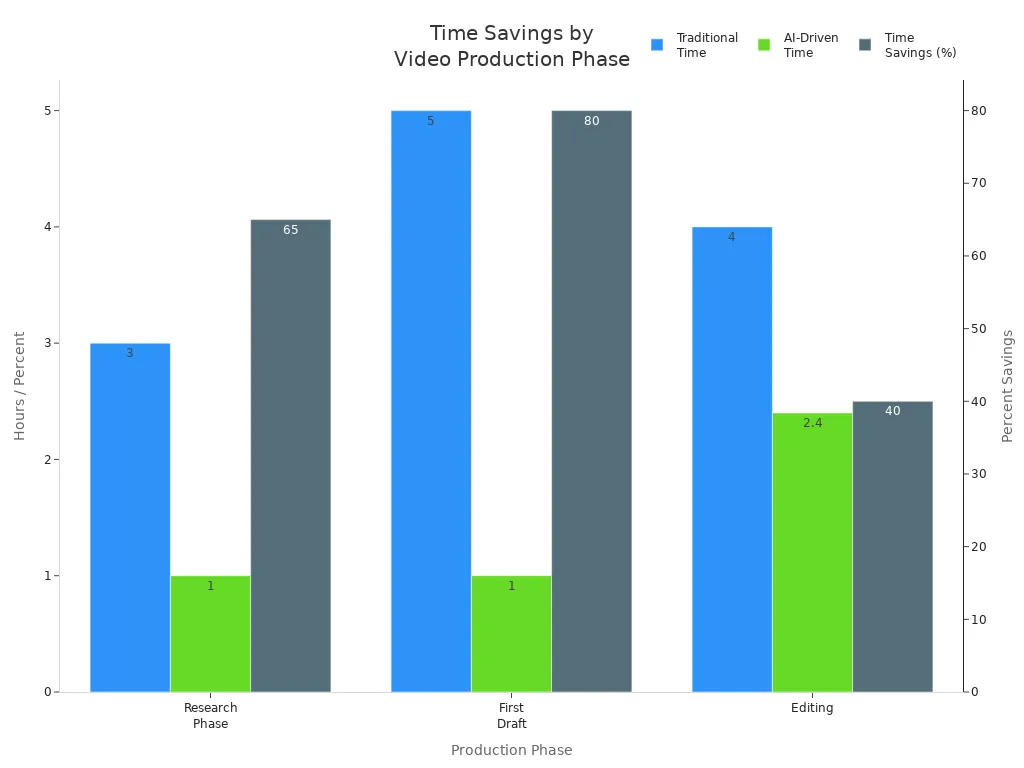
You want to make cool videos, but burnout is tough. A viral video toolkit helps you stop burnout fast. Almost 90% of creators feel stressed by making content. You can save lots of time by using smarter tools.
Make your work easier
Let editing happen by itself
Get your energy back
Key Takeaways
The viral video toolkit lets creators work faster. It helps them avoid burnout by doing video tasks automatically.
Creators need to notice burnout signs, like being tired or not wanting to work. This is important to keep their passion and creativity strong.
Using organized steps and checking how videos do can help creators feel motivated. It also makes videos better and helps get more people interested.
Burnout Signs and Video Creation Challenges

Recognizing Creator Burnout
You might feel tired all day, even after sleeping well. Sometimes you wake up and do not want to make videos. You may look at other creators and think you are not good enough. These are signs of burnout. Many creators feel this way, so you are not alone.
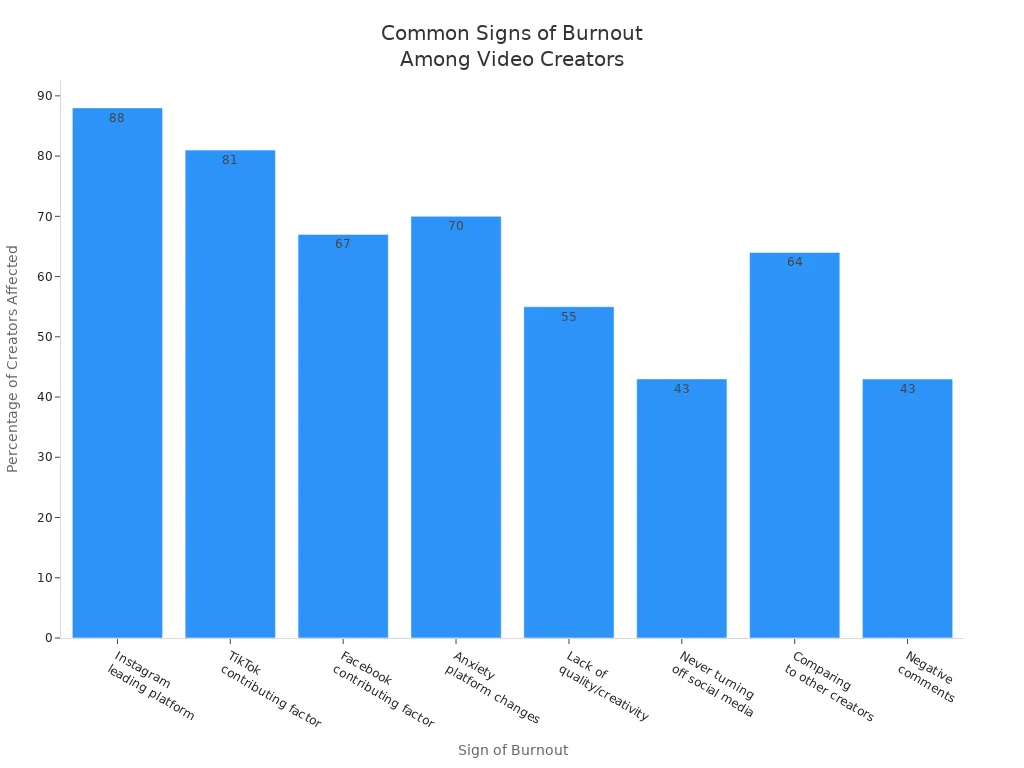
Here is a quick look at what creators say about burnout:
Sign of Burnout | Percentage of Creators Affected |
|---|---|
Instagram as a leading platform | |
TikTok as a contributing factor | 81% |
Facebook as a contributing factor | 67% |
Anxiety from constant platform changes | 70% |
Lack of quality or creativity | 55% |
Never turning off from social media | 43% |
Impact of comparing to other creators | 64% |
Negative comments affecting burnout | 43% |
You might also notice these things:
Feeling very tired or slow
Having trouble finishing easy work
Not trusting your own ideas
Getting mad at friends or family
Putting off work or missing due dates
Common Video Production Struggles
Making videos can be hard. You might have problems like:
Not enough money for your ideas
Equipment that breaks or does not work
Deadlines that are too close
Team members who do not agree
Trouble finding a place to film or bad weather
LinkStart AI Radar
Join our Telegram community for more AI updates!
Creative fatigue can happen too. You might get fewer likes or comments on your videos. Sometimes, people get bored with the same content. A viral video toolkit can help you keep your videos new and exciting.
Tip: If you feel stuck or stressed, remember you are not alone. Many creators have these problems, but there are tools and ways to help you feel better.
Viral Video Toolkit Features and Workflow
Streamlining Content Creation
Making videos can feel like too much sometimes. The Idea-to-Shorts Factory helps you turn ideas into finished videos easily. You start with a simple idea. The toolkit breaks it down into clear steps for you. The Seedance method helps you plan your video shot by shot. This gives you a guide, so you know what to film.
The Seedance method lets you make whole story sequences with one prompt. You do not have to put shots together yourself.
You get three shots in order, with matching characters, rain, and mood. Other tools need extra steps for each shot.
The toolkit keeps your story the same, moves the camera smoothly, and makes things faster. You can make videos much quicker than before.
With the viral video toolkit, you can make up to 90 videos each month. If you have three clients, you can give each one 30 videos. You can finish a month’s videos in about an hour. This speed helps you stay ahead and keeps your viewers interested.
Tip: If you want to work with others, the toolkit lets you team up. You can chat, manage projects, and create together, even from far away.
Automation and Efficiency
Editing videos takes a lot of time. The viral video toolkit does many tasks for you. You do not need to spend hours editing by hand. Here are some features that help you:
Text-to-video generation: Make short clips from your ideas with just a few words.
AI green screen: Remove backgrounds without special gear.
Motion tracking and effects: Add cool visuals without extra work.
Dynamic data merge: Fill templates with text, images, and footage automatically.
Batch rendering: Make lots of video versions at once.
Conditional logic: Handle missing data without messing up your video.
Article to video: Turn blog posts into video summaries with matching footage.
Video highlights and auto-summarization: Pick out the best parts of long videos.
Auto-captioning and transcription: Add captions to make things clear.
Auto beat sync and tempo editing: Match your video cuts to the music.
The toolkit uses ffmpeg to make editing faster. You get a simple interface with drag-and-drop tools. You can preview your edits, use presets, and work without learning hard commands. This saves time and lets you focus on your ideas.
Note: Creators say the toolkit is easy to use. The drag-and-drop interface is simple to learn. You can start making videos right away, even if you are new.
Tracking and Improving Output
You want to see how your videos are doing. The viral video toolkit tracks your content performance. You can see important numbers in one place:
Metric Type | Description |
|---|---|
Resource utilization metrics | Measure how much system resources like CPU and memory are used. |
Performance metrics | Measure how fast the system responds and how long it takes. |
Error rates metrics | Track how many errors or failures happen in the system. |
Saturation metrics | Check how much resources are used, like active connections. |
Availability metrics | See how often the system is up and running, including downtime. |
You can use audience data to see when your followers are most active. Posting often builds excitement and keeps your audience coming back. The toolkit lets you change your plan to catch trending topics and interact in real time.
You can work with your team using built-in tools. These tools help you talk, manage projects, and create together.
You get articles, webinars, templates, and job aids to help you learn and grow.
The toolkit connects with TikTok, YouTube Shorts, and Instagram Reels. You can post your videos on different platforms and change them for each audience. Secure authentication keeps your accounts safe.
Feature | Description |
|---|---|
API Utilization | Uses official APIs for TikTok, YouTube Shorts, and Instagram Reels. |
OAuth Authentication | Secure access without risking your account. |
Cross-Posting | Change and post content for each platform to get more engagement. |
Tip: Tracking your videos helps you stay consistent and grow your audience. You can see what works, make changes, and keep getting better.
Regaining Motivation and Success Stories
Toolkit Workflow Steps
You can get your energy back and boost your creativity with a simple process. The viral video toolkit gives you clear steps to follow when you feel stuck or tired:
Notice when you need a break and give yourself time to rest.
Think about where your feedback comes from and if it helps you.
Reach out for support if things feel too heavy.
Remember why you started making videos and what excites you.
Look at feedback with your own creative vision in mind.
Make a plan to improve your videos, or decide if you want to change anything.
Try to build a habit of making videos, even if it’s just a little each day.
Tip: Small steps can help you feel better and get back to making awesome content.
Creator Success Stories
Many creators have used the toolkit to turn things around. Matthew Fleming learned to balance his work and health, so he could keep making videos without feeling worn out. Jeff Perry helped a client leave a stressful job and start a business that brought joy and energy back into his life. Leon van der Laan set new boundaries and focused on what mattered most, which helped him recover and teach others to do the same.
Here are some results creators have seen after using the toolkit:
Outcome Description | Measurable Result |
|---|---|
Over 4.6 million Instagram posts under #DanielWellington | Significant sales growth |
Built a global fitness community | Over $500 million in revenue |
$100 million in sales within 40 days of launch | N/A |
Millions of video views | Increased store sales |
Over 500,000 user-generated posts | Boosted sales |
Increased bookings | Enhanced brand awareness |
You can also see these positive changes:
72% of creators say partnerships help them get noticed.
78% feel their audience likes their brand more.
67% keep the same engagement with sponsored and regular videos.
Note: You can use the viral video toolkit to stay motivated, grow your audience, and keep your content fresh.
You can beat burnout fast with the viral video toolkit. Automation saves you hours and keeps your energy high. The structured workflow helps you stay organized and creative. Tracking your progress boosts motivation. Many creators report better results and less stress. Try it and see how easy video creation can feel.
FAQ
How fast can you make videos with the toolkit?
You can create up to 90 videos in one hour. The toolkit speeds up every step and keeps your workflow simple.
Do you need video editing skills to use the toolkit?
Nope! You can start making videos right away. The drag-and-drop interface makes everything easy, even if you are new.
Can you track how your videos perform?
Yes! The toolkit shows your video stats in one place. You can see what works and improve your content every week.
See Also
Best 10 AI Tools for TikTok Video Creation in 2025
Using AI Voice Cloning to Cut Voiceover Costs Dramatically
Creating Captivating Social Media Graphics Using AI Solutions
Streamlining Content Marketing with Cowork and Zapier Automation
Establishing Your Own Content Empire with Cowork and Airtable